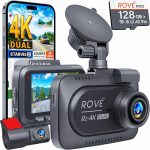
Picture this: you are sitting in your parked car at a shopping center, and you watch a driver clumsily reverse into your front bumper. You rush out, but they are already driving away. If your dash cam was running, you would have the evidence. But what if your car’s battery is old, or you want to record for hours without draining the engine’s starter battery? The solution is simpler than you think: a portable battery pack.
In 2026, running a dash cam off a battery pack is not only possible, it is becoming the preferred method for many drivers who want 24/7 surveillance without the risk of a dead car battery. This guide will explain exactly how to choose the right battery pack, how to connect it, and what pitfalls to avoid. Whether you are a road trip enthusiast, a rideshare driver, or someone who just wants peace of mind in a parking lot, you will learn everything you need to know about powering your dash cam with a portable battery.
Understanding the Power Requirements of Your Dash Cam
Before you buy any battery pack, you must understand what your dash cam needs to run. Most dash cams operate on 5 volts of direct current (DC) power, delivered through a USB cable. However, the amount of current they draw varies significantly. A basic single-channel dash cam might draw only 0.5 to 1.0 amps (500 to 1000 milliamps), while a high-end 4K model with two cameras and Wi-Fi streaming can draw 2.0 amps or more. The key specification to look for is the power consumption in watts, which you can calculate by multiplying volts by amps (5V x 1.5A = 7.5 watts).
The second critical factor is whether your dash cam has a parking mode feature. Parking mode allows the camera to continue recording when the car is off, but it often uses a motion sensor or time-lapse recording to save power. In this mode, a typical dash cam might consume only 0.3 to 0.5 amps, which is much more manageable for a battery pack. However, if you want continuous recording at full resolution, you will need a much larger battery capacity. For example, a dash cam drawing 1.5 amps continuously will drain a 10,000 milliamp-hour (mAh) battery pack in roughly 6.6 hours, assuming no power loss.
Finally, you need to consider the voltage input of your dash cam. Most dash cams are designed to accept 5V USB power, but some older or professional models might require 12V input. If your dash cam uses a 12V cigarette lighter plug, you will need a battery pack that has a 12V DC output or a special adapter cable. Always check the manufacturer’s specifications for your specific dash cam model before purchasing a battery pack. A mismatch in voltage can damage your camera or simply prevent it from turning on.
Choosing the Right Battery Pack: Capacity, Chemistry, and Features
The most important specification for a dash cam battery pack is its capacity, measured in milliamp-hours (mAh) or watt-hours (Wh). For a general rule of thumb, a 10,000 mAh battery pack (which is roughly 37 Wh at 3.7V) will power a typical dash cam in parking mode for about 12 to 18 hours. If you need overnight protection, look for packs in the 20,000 to 30,000 mAh range. However, be aware that larger capacity packs are heavier and bulkier, which can be a problem if you want to hide the pack in your glove box or under a seat.
The chemistry of the battery cells matters for safety and longevity. Lithium-ion (Li-ion) packs are the most common and offer a good balance of capacity and price. Lithium-polymer (Li) packs are lighter and can be made in thinner shapes, but they are more sensitive to temperature extremes. For a car that sits in direct sunlight, you should avoid cheap Li-ion packs that lack temperature protection circuits. In 2026, many premium battery packs designed for dash cams use lithium iron phosphate (LiFePO4) cells, which are much safer at high temperatures and have a longer cycle life. These packs are more expensive but are worth the investment if you live in a hot climate.
Beyond capacity and chemistry, look for specific features that make a battery pack dash cam-friendly. The most important is pass-through charging, which allows the pack to charge from your car’s 12V outlet while simultaneously powering the dash cam. This means you can leave the pack plugged in permanently, and it will automatically switch to battery power when the car is off. Other useful features include a low-power standby mode, a physical on/off switch to prevent parasitic drain, and multiple USB ports so you can power a rear camera or a phone charger. Avoid packs that have bright LED lights that cannot be turned off, as they can be distracting at night.
How to Connect Your Dash Cam to a Battery Pack
Connecting a dash cam to a battery pack is straightforward, but the method depends on whether you want a permanent installation or a temporary setup. For a temporary setup, simply plug the dash cam’s USB cable into the battery pack’s USB output port, and place the pack in your center console or cup holder. This is ideal for road trips or when you only need extra recording time occasionally. The downside is that you must remember to charge the pack manually by plugging it into a wall outlet or your car’s USB port.
For a permanent installation, you will want to hardwire the battery pack to your car’s electrical system. This involves connecting the pack’s input cable to a constant 12V power source (like the fuse box) and a ground point. Many dedicated dash cam battery packs come with a hardwiring kit that includes a voltage cutoff feature. This prevents the pack from draining your car’s starter battery below a safe level, usually around 11.8 to 12.0 volts. You then connect your dash cam to the pack’s output port, and the pack handles the power management automatically.
A third option is to use a battery pack that is specifically designed for dash cams, such as the popular Cellink or Blackvue models. These packs are shaped to fit under a car seat or in the trunk and include all the necessary cables and fuses. They also have intelligent circuitry that prioritizes charging the pack when the car is running and switches to battery power when the engine is off. This is the most reliable solution for 24/7 recording, but it is also the most expensive, with prices ranging from $150 to $400 in 2026. For most users, a high-quality general-purpose power bank with pass-through charging will work perfectly well.
Common Mistakes and How to Avoid Them
One of the most common mistakes is using a battery pack that does not support pass-through charging. If you plug your dash cam into a standard power bank, the dash cam will drain the battery, and the battery will not charge from the car at the same time. This means you will have to manually charge the pack every day, which defeats the purpose of a permanent installation. Always check the product description for the phrase “pass-through charging” or “simultaneous charge and discharge.”
Another frequent error is underestimating the impact of temperature. A battery pack left in a car on a hot summer day can reach internal temperatures of 140 degrees Fahrenheit or more. Standard lithium-ion batteries can swell, leak, or even catch fire at these temperatures. In 2026, many manufacturers have addressed this by adding temperature sensors that shut down the pack if it gets too hot. However, you should still avoid placing the pack in direct sunlight or near the windshield. The best location is under a seat or in the glove box, where temperatures are more moderate.
Finally, do not forget about cable management. A loose USB cable can interfere with your gear shifter, get caught in the steering column, or become a tripping hazard. Use adhesive cable clips to route the wire along the edge of the dashboard or under the carpet. For a cleaner look, you can purchase a right-angle USB adapter that keeps the plug flush against the battery pack. Also, ensure that the cable you use is rated for the current your dash cam draws. A cheap, thin cable can cause voltage drop, which may cause your dash cam to reboot or shut down unexpectedly.
Real-World Scenarios and Performance Expectations
Let us look at a typical scenario: you have a 2026 mid-range dash cam that draws 0.8 amps in parking mode. You pair it with a ,000 mAh battery pack that has an 85% efficiency rating. In theory, you have 17,000 mAh of usable power (20,000 x 0.85). Dividing 17,000 mAh by 800 mA (0.8 amps) gives you 21.25 hours recording time. This is enough to cover a full workday plus night, but not a full weekend. If you need longer coverage, you would need a larger pack or a dash cam with a lower power draw.
For rideshare drivers, a battery pack is a game-changer. You can run your dash cam continuously during your shift without worrying about your car battery dying. Many rideshare drivers in 2026 use a 30,000 mAh pack that they charge at home overnight and then plug into their car’s 12V outlet during the day. The pack acts as a buffer, charging from the car’s alternator while driving and powering the camera when the car is parked between rides. This setup can easily last a 12-hour shift with plenty of reserve.
For those who live in apartments without a garage, a battery pack allows you to take your dash cam power source inside with you. You can charge the pack at your desk or nightstand and then bring it back to the car in the morning. This eliminates the need for hardwiring and gives you full control over the battery’s charge level. Just remember to unplug the dash cam from the pack when you bring it inside, or the camera will continue to record and drain the pack. Some users solve this by using a pack with a physical power switch.
Frequently Asked Questions
Can I use any USB power bank to run my dash cam?
Yes, you can use any standard USB power bank, but it must support pass-through charging if you want it to work automatically with your car. Without pass-through, the power bank will only power the camera until it runs out of charge, and you will to recharge it manually. Also, ensure the power bank can deliver enough current (amps) for your specific dash cam model.
How long will a 10,000 mAh battery pack power my dash cam?
A 10,000 mAh pack will typically power a dash cam in parking mode for 12 to 18 hours, depending on the camera’s power draw. For a camera drawing 0.5 amps, you can expect around 17 hours. For a camera drawing 1.0 amps, expect around 8.5 hours. These estimates assume 85% efficiency, as some power is lost as heat.
Is it safe to leave a battery pack in a hot car?
It can be safe if you use a battery pack with built-in temperature protection and high-quality cells. Avoid leaving standard lithium-ion packs in direct sunlight or in cars that exceed 140 degrees Fahrenheit. Dedicated dash cam battery packs with LiFePO4 chemistry are much safer for hot environments and are designed to withstand automotive temperature ranges.
Will a battery pack drain my car’s starter battery?
No, not if you set it up correctly. When you hardwire a battery pack, you connect it to a constant 12V source. Most dedicated packs have a low-voltage cutoff that stops drawing power from your car’s battery once it drops to a safe level (usually 11.8V). If you use a standard power bank, you must unplug it when the car is off to avoid draining the car battery through the 12V socket.
Can I charge the battery pack and run the dash cam at the same time?
Yes, but only if the battery pack supports pass-through charging. Many modern power banks and all dedicated dash cam battery packs support this feature. When the car is running, the pack charges from the alternator while simultaneously powering the dash cam. When the car is off, the pack automatically switches to battery mode to keep the camera running.
Conclusion
Running a dash cam off a battery pack is a practical, flexible, and safe solution for anyone who wants continuous recording without risking a dead car battery. By understanding your dash cam’s power needs, choosing the right battery capacity and chemistry, and setting up the connection properly, you can enjoy 24/7 surveillance for parking lots, road trips, or daily commutes. The key to prioritize pass-through charging, temperature safety, and cable management for a reliable setup.
In 2026, the technology has matured to the point where a quality battery pack is an affordable and essential accessory for any dash cam owner. Whether you opt for a simple power bank or a dedicated hardwired unit, you are taking a smart step toward protecting your vehicle and your peace of mind. Start by checking your dash cam’s specifications, then choose a battery pack that fits your budget and recording needs. Your future self will thank you when you capture that hit-and-run driver or that beautiful sunset time-lapse.

Tony Kilmer is an auto mechanic and the author behind CarTruckAdvisor.com. He shares practical, no-nonsense guidance on car and truck maintenance, common problems, and repair decisions—helping drivers understand what’s going on and what to do next.