You are driving down a busy highway when a car suddenly swerves into your lane, forcing you to brake hard. The driver behind you is not so lucky, rear-ending your vehicle. In the chaos that follows, the other driver claims you stopped suddenly for no reason. Without proof, it is your word against theirs. This is the exact scenario where a dash cam transforms from a gadget into your most valuable witness, saving you thousands in insurance disputes and legal headaches.
In 2026, dash cams have evolved from niche accessories into essential safety tools for every driver. With features like 4K resolution, cloud storage, and AI-powered driver assistance, modern dash cams offer unprecedented protection. This comprehensive guide will walk you through everything you need to know about using a dash cam effectively, from unboxing and installation to advanced features and legal considerations. Whether you are first-time user or looking to upgrade your setup, you will learn practical steps to maximize your dash cam investment.
Choosing the Right Dash Cam for Your Needs
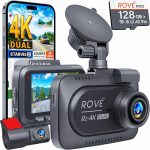
Before you can use a dash cam, you need to select one that fits your driving habits and budget. The market in 2026 offers three main categories: basic single-channel cameras that record only the front view, dual-channel systems that capture both front and rear, and premium multi-camera setups that can monitor the interior and sides of your vehicle. For most daily commuters, a dual-channel system provides the best balance of coverage and value, as it captures both what is ahead and what is behind you.
Key specifications to consider include video resolution, with 4K being the new standard for capturing license plates clearly. Look for models with a wide dynamic range (WDR) to handle bright sunlight and dark tunnels without washing out details. Night vision capability is crucial, as many accidents occur in low-light conditions. Additionally, consider storage options: most dash cams use microSD cards, but newer models offer built-in eMMC storage or cloud backup. A 128GB or 256GB card is recommended for continuous loop recording without frequent overwrites.
Practical advice: Do not overspend on features you will never use. If you rarely drive at night, a basic 1080p model with good daytime clarity may suffice. However, if you frequently drive in urban areas with heavy traffic or park on the street, invest in a model with parking mode and motion detection. Read user reviews specifically about reliability in extreme temperatures, as cheap dash cams often fail in hot summer months. Remember, the best dash cam is the one you actually install and use consistently.
Step-by-Step Installation and Setup
Installing a dash cam is simpler than most people think, and you can complete it in under 30 minutes with basic tools. Start by choosing the mounting location: behind the rearview mirror is ideal because it provides a clear view of the road without obstructing your vision. Clean the windshield area thoroughly with an alcohol wipe to ensure the adhesive mount sticks firmly. Most dash cams use a suction cup or 3M adhesive pad; suction cups are easier to remove, while adhesive mounts are more secure in hot weather.
Next, route the power cable along the headliner and down the A-pillar to hide it from view. Use a plastic trim tool to tuck the cable under the weather stripping, then run it behind the glove box to the cigarette lighter or USB port. For a cleaner installation, consider a hardwire kit that connects directly to your vehicle’s fuse box, allowing the dash cam to turn on and off with the ignition. Hardwiring also frees up your 12V port for other devices. If you are not comfortable with electrical work, many auto shops offer installation for around $50 to $100.
After physical installation, configure the settings through the dash cam’s menu or companion app. Set the date and time, enable loop recording (typically 3-minute segments), and adjust the video resolution to the highest setting your memory card can handle. Activate G-sensor sensitivity to medium, so it automatically saves footage during sudden impacts without triggering false alarms from potholes. Finally, format your memory card inside the dash cam to ensure compatibility, and perform a test drive to verify the camera angle captures both the road and your dashboard clearly.
Daily Operation and Recording Best Practices
Once installed, your dash cam should operate automatically whenever the vehicle is running. Most modern dash cams have a startup delay of 5 to 10 seconds, so do not worry if you do not see the recording light immediately. During your drive, the camera continuously records in a loop, overwriting the oldest footage when the memory card is full. Important events, such as hard braking or collisions, are automatically saved to a protected folder that cannot be overwritten. You can also manually save footage by pressing a dedicated button on the camera.
To get the most out of your dash cam, develop a routine for managing footage. Check your memory card monthly to ensure it is functioning properly and has not become corrupted. If you encounter an incident, immediately save the footage by pressing the manual save button or transferring the file to your smartphone via Wi-Fi or Bluetooth. Many dash cams in 2026 offer cloud connectivity, automatically uploading important clips to a secure server. This is especially useful if your camera is damaged or stolen in an accident.
Practical tips for daily use: Keep your windshield clean, as dirt and smudges degrade video quality. Adjust the camera angle seasonally if you change your driving position or seat height. If your dash cam has a built-in battery, be aware that extreme cold can drain it quickly; models with supercapacitors are more reliable in freezing temperatures. Finally, resist the temptation to constantly check the live view while driving, as this is a dangerous distraction. Trust the device to do its job and review footage only when needed.
Key Takeaways
- ✓ Choose a dual-channel dash cam with 4K resolution and wide dynamic range for optimal coverage and clarity in all lighting conditions.
- ✓ Install the camera behind the rearview mirror and hardwire it to the fuse box for a clean, always-on setup with parking mode capability.
- ✓ Configure loop recording, G-sensor sensitivity, and automatic event saving to ensure critical footage is never overwritten.
- ✓ Leverage advanced features like parking mode, GPS tracking, and AI alerts, but disable audio recording if local consent laws require it.
- ✓ Follow legal best practices by informing passengers of recording, blurring faces in shared footage, and cooperating with law enforcement during incidents.
Frequently Asked Questions
Do I need to format my memory card regularly?
Yes, you should format your memory card inside the dash cam every two to four weeks to prevent file corruption and ensure reliable performance. Most dash cams have a format option in the settings menu. Avoid formatting on a computer, as this can create incompatible file systems. If you notice the camera freezing or failing to record, formatting often resolves the issue.
Can a dash cam drain my car battery overnight?
It can if you use parking mode without a voltage cutoff. Most hardwire kits include a low-voltage protector that automatically shuts off the dash cam when the battery drops to a safe level, typically 11.8 to 12.0 volts. If you use the cigarette lighter adapter, the camera will only run when the is on, so battery drain is not concern. For overnight parking, ensure your dash cam’s parking mode is configured correctly.
How do I retrieve footage from my dash cam?
There are three common methods. First, remove the microSD card and insert it into a computer using an adapter. Second, connect the dash cam directly to a computer via USB cable. Third, use the dash cam’s Wi-Fi or Bluetooth to transfer files to a smartphone app. Cloud-enabled models automatically upload footage to a secure server, which you can access from anywhere. Always save important clips to a separate device or cloud storage for backup.
Is it legal to use a dash cam in 50 US states?
Yes, it is legal to use a dash cam for video recording on public roads in all 50 states. However, audio recording laws vary. States like California, Florida, and Pennsylvania require all-party consent for audio recording, meaning you must inform passengers. States like New York and Texas have one-party consent, where only one person (the driver) needs to consent. Always disable audio if you are unsure of the laws in your area.
What should I do if my dash cam stops recording?
First, check if the memory card is full or corrupted. Format the card in the camera to resolve most issues. Next, ensure the power cable is securely connected and the cigarette lighter or USB port is working. If the camera has a battery, try charging it fully. For persistent problems, update the firmware from the manufacturer’s website. If none of these steps work, the camera may have a hardware defect, and you should contact customer support for a replacement.
Conclusion
A dash cam is one of the most cost-effective investments you can make for your safety and peace of mind on the road. From selecting the right model with 4K resolution and parking mode to installing it cleanly and configuring advanced features, each step ensures you are protected in the event of an accident, vandalism, or false claim. By following the best practices outlined in this guide, you can maximize the reliability and usefulness of your dash while staying compliant with legal requirements.
Now is the time to take action. If you do not already have a dash cam, purchase one that matches your driving needs and install it this weekend. If you already own one, review your current setup, format your memory card, and test your parking mode. Share this guide with fellow drivers who could benefit from the protection a dash cam provides. Remember, the footage you capture today could be the evidence that saves you thousands tomorrow. Drive safe, and let your dash cam be your silent guardian.

Tony Kilmer is an auto mechanic and the author behind CarTruckAdvisor.com. He shares practical, no-nonsense guidance on car and truck maintenance, common problems, and repair decisions—helping drivers understand what’s going on and what to do next.