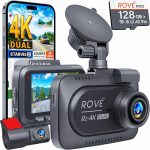
You have just unboxed your new dash cam, a sleek piece of technology promising to protect you from false accident claims, capture scenic road trips, and provide peace of mind. But now, staring at the windshield and the dangling power cable, you face the real challenge: how do you hook it up without making your car look like a tangled mess of wires? The good news is that installing a dash cam has become significantly easier in 2026, with smarter kits and more car-friendly designs than ever before.
This guide will walk you through every method of hooking up a dash cam, from the simplest plug-and-play setup to a professional-grade hardwire installation. Whether you are a complete beginner who just wants to hide the cable or a DIY enthusiast looking for 24/7 parking surveillance, you will learn the exact steps, tools, and safety precautions needed. By the end of this article, you be able to choose the right installation method for your vehicle and your skill level, ensuring your dash cam works perfectly every time you drive.
Understanding Your Dash Cam and Power Options
Before you touch a single wire, you must understand what you are working with. Dash cams in 2026 typically come with one of three power connectors: a standard USB-A or USB-C cable, a 12V cigarette lighter adapter, or a dedicated hardwiring kit. The method you choose to hook up your dash cam depends entirely on which of these cables you have and what features you want. For example, a basic USB cable is perfect for a temporary setup, while a hardwiring kit is essential for enabling parking mode, which records when your car is parked and turned off.
The most common mistake people make is rushing to plug the dash cam into the cigarette lighter port. While this works instantly, it leaves a long, ugly cable dangling across your dashboard and center console. In 2026, modern vehicles have multiple USB ports, often located in the center armrest or under the dashboard. Using these ports can be a cleaner solution, but you must check your car’s manual to ensure the port provides enough power (usually 5V/1.5A or higher) for your dash cam to function reliably. A low-power port can cause the camera to shut off randomly or fail to record in high-resolution.
Finally, consider your long-term goals. If you want your dash cam to record while you are parked at the mall or overnight in your driveway, you need a hardwire kit that connects directly to your car’s fuse box. This kit includes a voltage cutoff device that prevents your car battery from draining completely. Without this feature, your dash cam could kill your battery in a few hours. Understanding these three power sources—cigarette lighter, USB port, and fuse box—is the foundation of a successful installation.
The Simple Method: Plugging into the Cigarette Lighter or USB Port
For most people, the easiest way to hook up a dash cam is to simply plug it into your car’s 12V cigarette lighter socket or a dedicated USB port. This method requires zero tools and takes about two minutes. Start by the dash cam on your windshield, ideally behind the rearview mirror to avoid obstructing your view. Then, plug the included power cable into the camera and the other end into the power socket. The camera will power on automatically when you start the car. This is the perfect solution for a rental car, a temporary setup, or if you are not comfortable working with car electronics.
However, the downside is the cable management. A dangling wire is not only ugly but also a safety hazard, as it can interfere with your gear shifter or get caught on your steering wheel. To fix this, you can tuck the cable along the edge of your windshield headliner. Using your fingers or a plastic trim tool, gently push the cable into the gap between the windshield and the roof liner. Run the cable down the passenger side A-pillar, then under the glove box, and finally to the center console. This process, while simple, requires patience to ensure the cable is completely hidden and does not interfere with side curtain airbags.
A critical tip for 2026: many new electric vehicles (EVs) and hybrids have a feature where the cigarette lighter port turns off after a few minutes, even if the car is still on. This can cause your dash cam to shut down unexpectedly during a short stop. If you notice this happening, you may need to switch to a USB port that stays powered, or consider the hardwiring method described in the next section. Always test your setup by turning the car off and waiting five minutes to see if the camera stays on or shuts down as expected.
The Professional Method: Hardwiring Your Dash Cam to the Fuse Box
Hardwiring your dash cam is the gold standard for a clean, permanent installation. This method connects the camera directly to your vehicle’s electrical system via the fuse box, allowing the camera to turn on and off with the ignition and enabling parking mode. To begin, you will need a hardwire kit specifically designed for your dash model. This kit includes a step-down converter (to reduce 12V car power to 5V camera power) and a fuse tap. You will also need a multimeter, a plastic trim removal tool, and a few zip ties.
Start by locating your car’s interior fuse box. This is usually under the dashboard on the driver’s side, inside the glove box, or behind a panel in the footwell. Consult your owner’s manual to find the exact location and to identify which fuses are for accessories (like the radio or power windows) and which are always on (like the interior lights). Use your multimeter to confirm which fuse slots have power only when the ignition on. You will connect the red wire from your hardwire kit to an accessory fuse, and the yellow wire (if present) to a constant power fuse for parking mode. The black wire connects to a metal grounding bolt on the car’s chassis.
Once the wires are connected, route the cable from the fuse box up to the dash cam. This usually involves running the cable behind the dashboard, up the A-pillar and across the headliner. This is the most time-consuming part, but the result is a completely invisible installation. A crucial safety warning: never wrap the fuse tap wire around the prongs of a fuse; always use a proper fuse tap that inserts into the slot. Also, ensure the cable does not cross over any airbag deployment zones. If you are unsure, consult a professional installer. The peace of mind from a hardwired setup, including 24/7 parking surveillance, is well worth the effort.
Advanced Setup: Enabling Parking Mode and Using a Battery Pack
Parking mode is the feature that turns your dash cam into a security guard for your car. When hardwired correctly, the camera detects motion or impact while the car is parked and records a short clip. However, this feature can drain your car battery if not managed properly. In 2026, most quality hardwire kits include a voltage cutoff module. This device monitors your battery voltage and automatically shuts off the dash cam when the voltage drops a safe level (usually 11.8V or 12.0V), ensuring you can still start your engine. You can adjust this threshold on some kits.
For those who want maximum protection without risking their main battery, an external battery pack is the best solution. These dedicated dash cam batteries, like the Cellink or Blackvue models, are charged while you drive and then power the camera when the car is off. They are installed in the glove box or under a seat and wired to the fuse box for charging. This completely isolates the dash cam from your car’s starter battery, allowing for days of parking recording without any risk of a dead battery. The trade-off is the additional cost (around $150 to $300) and the extra installation time.
A practical example: imagine you park on a busy street. With a basic hardwire setup, your camera might record for 6 to 12 hours before the voltage cutoff kicks in. With a dedicated battery pack, you can get 24 to 48 hours of continuous recording. If you live in an area with high crime or street parking, this investment is invaluable. When hooking up your dash cam for parking mode, always test the sensitivity settings. Set the motion detection to medium to avoid recording every passing leaf, but ensure impact detection is set to high so a door ding triggers a recording.
Troubleshooting Common Installation Problems and Final Checks
Even with careful planning, you may encounter issues after hooking up your dash cam. The most common problem is the camera not turning on. First, check the power source. If using a cigarette lighter, ensure the adapter is pushed in all the way and the port is clean. If hardwired, use your multimeter to check voltage at the fuse tap and at the camera end of the cable. A loose ground connection is the number one cause of intermittent power loss. Double-check that your black ground wire is attached to a clean, unpainted metal surface.
Another frequent issue is the camera turning off randomly while driving. This is often due to a loose connection in the power cable or a faulty USB cable. Try a different, high-quality cable. Also, check the memory card. Dash cams require high-endurance microSD cards (rated for continuous writing). A standard card can overheat and fail, causing the camera to reboot. In 2026, a 128GB or 256GB high-endurance card is the standard recommendation for 4K recording. Format the card inside the camera before first use to ensure compatibility.
Finally, perform a road test. Drive for 15 minutes and review the footage. Ensure the camera is level, the date and time are correct (many cameras sync via GPS), and the video is smooth without stuttering. If you installed a rear camera, check that the cable is not pinched in the door seal. A final pro tip: use a small piece of static cling film on the windshield before mounting the camera. This makes it easy to remove the camera without leaving a sticky residue, which is especially useful if plan to move the camera between vehicles.
Key Takeaways
- ✓ The easiest installation method is plugging into a cigarette lighter or USB port, but it requires careful cable tucking for a clean look.
- ✓ Hardwiring to the fuse box is the best method for a permanent, invisible setup and enables parking mode recording.
- ✓ Always use a hardwire kit with a voltage cutoff module to prevent draining your car battery when using parking mode.
- ✓ For maximum parking protection, consider a dedicated external battery pack that isolates the dash cam from your starter battery.
- ✓ Troubleshoot common issues by checking the power source, ground connection, using a high-endurance memory card.
Frequently Asked Questions
Can I install a dash cam myself without any experience?
Yes, absolutely. The simplest method of plugging into a cigarette lighter requires no tools and takes minutes. For hardwiring, many beginners succeed by watching a few video tutorials and using a trim tool. However, if you are uncomfortable working near airbags or the fuse box, it is wise to pay a professional installer $50 to $100 for a clean, safe setup.
Will a dash cam drain my car battery if I hardwire it?
It can, but only if you do not use a voltage cutoff module. Modern hardwire kits include this safety feature, which automatically turns off the camera when the battery voltage drops to a safe level (e., 12.0V). This ensures you can always start your car. Without this module, a dash cam can drain a healthy battery in 6 to 12 hours.
How do I hide the dash cam cable without tools?
You can hide the cable by tucking it into the gap between the windshield and the roof liner using just your fingers. Run the cable down the side of the A-pillar (avoiding airbags), then under the rubber door seal, and finally under the glove box. This method requires no tools and leaves the cable completely out of sight.
What is the best fuse to use for hardwiring a dash cam?
The best fuse is an accessory fuse that only has power when the ignition is on. choices include fuses for the cigarette lighter, power windows, or radio. Use your owner’s manual and a multimeter to confirm. Never use a fuse for critical systems like the airbags, ABS, or engine control unit.
Do I need a special memory card for my dash cam?
Yes, you should use a high-endurance microSD card. Standard cards are not designed for the constant rewriting that dash cams require and can fail quickly. Look for cards labeled "High Endurance" or "Max Endurance" from brands like SanDisk or Samsung. A 128GB card is the sweet spot for 2026, offering days of footage before overwriting.
Conclusion
Hooking up a dash cam in 2026 is a straightforward process that ranges from a simple five-minute plug-in to a more involved hardwire installation. We have covered the three main methods: the quick and easy cigarette lighter setup, the clean and permanent hardwire installation, and the advanced parking mode configuration with external battery packs. Each method has its own benefits, and the right choice depends on your comfort level, your car, and how much protection you want. Remember to always prioritize safety by avoiding airbag zones and using proper voltage protection.
Now that you have the complete guide, it is time to take action. Start by deciding which installation method suits your needs best. Gather your tools, read your dash cam manual, and follow the steps outlined here. A properly installed dash cam is one of the best investments you can make for your car, providing evidence in accidents, capturing memorable road trips, and deterring theft. Do not let the fear of installation stop you; with a little patience, you can have a professional-looking setup that works flawlessly for years to come.

Tony Kilmer is an auto mechanic and the author behind CarTruckAdvisor.com. He shares practical, no-nonsense guidance on car and truck maintenance, common problems, and repair decisions—helping drivers understand what’s going on and what to do next.