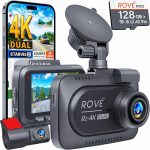
You have just unboxed your brand-new 4K Ultra HD dash cam, a device capable of capturing license plates from three lanes away and recording the subtle details of a sunset drive in stunning clarity. But now, the box sits on your passenger seat, and you are staring at a tangle of wires, a suction cup mount, and a tiny instruction manual written in six languages. The excitement of owning top-tier road surveillance technology can quickly turn into frustration if you do not know how to install it properly. A poorly installed dash cam is not just an eyesore; it can be a safety hazard, a source of battery drain, or worse, a camera that fails to record when you need it most.
This guide is designed to walk you through every step of installing a 4K Ultra HD dash cam in2026, from choosing the optimal mounting location to hardwiring the device for 24/7 parking mode. Whether you are a complete novice who has never touched a car’s fuse box or a seasoned DIYer looking for the latest best practices, this article will provide the technical knowledge and practical tips you need. By the end, you will have a professionally installed system that captures crisp, high-resolution footage without dangling wires or obstructing your view, giving you peace of mind every time you hit the road.
Pre-Installation Planning: Choosing the Right Camera and Tools
Before you even touch your windshield, you must ensure you have the right equipment for the job. In 2026, the market for 4K Ultra HD dash cams has matured significantly, with models offering features like Starvis 2 sensors for low-light performance, HDR (High Dynamic Range) processing, and built-in GPS for speed and location logging. When selecting your camera, prioritize models with a capacitor-based power supply rather than a lithium-ion battery, as capacitors handle extreme heat inside a parked car much better and have a longer lifespan. Also, verify that your chosen camera supports a high-quality memory card, specifically a high-endurance microSD card rated for continuous recording, such as a V30 or U3 class card with at least 128GB of storage.
The tools you will need are surprisingly simple and likely already in your home. Gather a plastic trim removal tool kit (available at any auto parts store for under $15), a microfiber cloth, isopropyl alcohol wipes, a fuse tap kit that matches your vehicle’s fuse type (micro, mini, or low-profile mini), a digital multimeter or a simple 12V test light, and a roll of adhesive cable clips. For hardwiring, you will also need the specific hardwire kit that comes with your dash cam or a universal one that steps the voltage down from 12V to 5V. Do not skip the trim removal tools; using a metal screwdriver will scratch your interior panels and leave permanent marks. Finally, check your vehicle’s owner’s manual to locate the fuse box diagram, which is typically found under the dashboard on the driver’s side or inside the engine bay.
One critical pre-installation step is to format your memory card inside the dash cam itself. Most 4K dash cams require you to format the card within the device to create the correct file system structure. Insert the microSD card, power the camera using a USB cable connected to a computer or a portable power bank, and navigate the settings menu to find the format option. This simple step prevents file corruption and ensures the camera can write data continuously without errors. Also, update the camera’s firmware the latest version by downloading it from the manufacturer’s website onto the memory card. Manufacturers frequently release updates that improve video processing algorithms and fix bugs, so doing this before installation saves you from having to remove the camera later.
Mounting the Camera: Achieving the Perfect Field of View
The location of your dash cam on the windshield is arguably the most important decision you will make. The golden rule is to mount the camera behind the rearview mirror, on the passenger side. This placement keeps the camera out of your direct line of sight, reduces glare from the sun, and ensures it is not a distraction while driving. In 2026, many 4K dash cams come with a polarizing filter (CPL) to cut down on windshield reflections, but even with this feature, mounting it behind the mirror is the most discreet and effective position. Before sticking the mount, sit in the driver’s seat and confirm that the camera body does not block your view of the road, the rearview mirror, or any of the vehicle’s advanced driver-assistance system (ADAS) sensors, which are often located near the top center of the windshield.
Clean the windshield surface meticulously before applying the mount. Use an isopropyl alcohol wipe to remove all oils, dirt, and residue from the glass. Follow up with a dry microfiber cloth to ensure the surface is perfectly dry and lint-free. If you are using a static cling mount (which is becoming more common in 2026 for easy removal), peel the backing and press it firmly against the glass, holding it for 30 seconds to ensure adhesion. For adhesive mounts, which are more secure for heavy 4K cameras, apply the mount and press firmly for a full minute. Do not mount the camera on the dotted area (the frit) around the edges of the windshield, as the rough texture prevents proper adhesion and can interfere with the camera’s autofocus and exposure metering.
Once the mount is secure, attach the camera and adjust the angle. Most 4K dash cams have a ball-joint mount that allows for tilt and swivel adjustments. Aim the lens so that the horizon line sits roughly one-third of the way from the top of the frame. You want to capture the road ahead, the hood of your car, and a bit of the sky. Avoid pointing the camera too high, which will wash out the road detail, or too low, which will miss traffic lights and signs. Use the camera’s live view feature on its screen or your smartphone app to fine-tune the angle. A common mistake is to center the camera perfectly, but this often results in a view that is too high. Instead, tilt it slightly downward to ensure you capture the front bumper of the car in front of you, which is critical for proving following distance in an accident.
Routing the Power Cable: The Art of a Clean, Hidden Installation
The most intimidating part of installing a dash cam for most people is hiding the power cable. The goal is to run the wire from the camera, up along the headliner, down the A-pillar, and into the fuse box or cigarette lighter, all without any visible wires. Start by tucking the cable into the gap between the windshield and the headliner. You can usually push the wire into this gap with your fingers or a trim tool. If the gap is tight, use a plastic trim tool to gently pry the headliner down just enough to slide the cable in. The headliner is typically held in place by friction clips, so you do not need to remove it entirely. Run the cable along the top edge of the windshield toward the driver’s side or passenger side A-pillar, depending on where your fuse box is located.
When you reach the A-pillar, you must be careful. The A-pillar is often covered by a plastic trim piece that houses side-curtain airbags. Do not simply shove the cable behind this trim without knowing where the airbag is. Use your trim tool to gently pop off the A-pillar cover, starting from the top. Behind it, you will see the airbag folded up. Route the dash cam cable behind the airbag, not in front of it. Use zip ties or electrical tape to secure the cable to an existing wire harness, ensuring it will not interfere with the airbag’s deployment path. If you are uncomfortable touching the airbag area, you can run the cable along the top edge of the windshield and then down the side of the dashboard, using adhesive cable clips to keep it tidy. This method is slightly less clean but much safer for beginners.
From the A-pillar, continue routing the cable down the side of the dashboard toward the fuse box. You can usually tuck the wire behind the rubber door seal, which pulls away easily and snaps back into place. Run the cable under the dashboard, using zip ties or clips to secure it away from the pedals and steering column. If you are using the cigarette lighter adapter, plug it in and you are done. However, for a professional finish in 2026, you should hardwire the camera. Locate your vehicle’s interior fuse box (usually under the steering wheel) and identify a fuse slot that is switched (only powered when the ignition is on) for your main power, and one that is always on for parking mode. Common choices for switched power are the cigarette lighter or windshield wiper fuses. Use your multimeter to confirm which slots are live with the key on and off.
Hardwiring for Continuous Power: Enabling Parking Mode and Battery Protection
Hardwiring your 4K Ultra HD dash cam is the single best upgrade you can make for a seamless experience. It eliminates the dangling cigarette lighter cable, frees up your 12V port, and enables parking mode, which allows the camera to record motion or impact events while your car is parked and turned off. To do this, you will use a fuse tap, which is a small adapter that plugs into an empty or existing fuse slot and provides a new fused circuit for your dash cam. Remove the fuse tap’s cover, insert the fuse for your camera (usually a 5-amp or 10-amp fuse) into the bottom slot, and the original vehicle fuse into the top slot. This ensures both the original circuit and your dash cam are protected.
Connect the fuse tap to your dash cam’s hardwire kit. The hardwire kit typically has three wires: a red wire for constant 12V power (Battery), a yellow wire for switched 12V power (ACC), and a black wire for ground. Plug the fuse tap into the constant power slot (always on) and connect the red wire. Plug a second fuse tap into the switched power slot (ignition on) and connect the yellow wire. For the ground wire, find a clean, unpainted metal bolt or screw near the fuse box. Loosen the bolt, wrap the black wire’s ring terminal around it, and tighten it securely. A poor ground connection is the most common cause of dash cam malfunctions, so ensure the metal is bare and the connection is tight.
In 2026, most premium hardwire kits include a voltage cutoff feature, often called a low-voltage protector. This is critical for parking mode because it prevents your dash cam from draining your car battery below the level needed to start the engine. Set the voltage cutoff to 12.0V or 12.2V, depending on your battery’s health. If you have a newer AGM battery, you can set it lower (11.8V). The hardwire kit will automatically shut off power to the camera when the voltage drops to this threshold. Test your installation by turning the ignition on and off. The camera should power on when the car starts and enter parking mode (usually indicated by a pulsing LED) when the car is turned off. If the camera does not behave correctly, double-check your fuse tap connections and the voltage settings on the hardwire kit.
Final Configuration and Testing: Optimizing Your 4K Footage
With the camera physically installed and powered, the final step is to configure the settings for optimal performance. Start by setting the video resolution to the highest available, which is typically 4K at 30 frames per second (fps) or 2160p. Some cameras offer 4K at 60fps, but this often reduces the bitrate and can cause overheating in direct sunlight. For most users, 4K at 30fps with HDR enabled provides the best balance of clarity and reliability. Enable the G-sensor (impact sensor) and set it to medium sensitivity. Too high, and you will get false alerts from potholes; too low, and it might miss a significant collision. Turn on loop recording, which automatically overwrites the oldest footage when the memory card is full, ensuring you never run out of space.
Next, configure the parking mode settings. Choose between time-lapse recording (which captures a frame every second), motion detection (which records only when movement is detected), or buffered impact detection (which records a few seconds before and after an impact). Buffered impact detection is the most reliable for capturing hit-and-run incidents, but it requires a constant power source. Set the parking mode recording duration to 24 hours or unlimited, depending on your battery’s capacity and the voltage cutoff setting. Also, enable the camera’s built-in GPS to embed your speed and location data into the video file. This data can be crucial for insurance claims, but be aware that it can also be used against you if you were speeding, so check local laws regarding GPS evidence.
Finally, perform a real-world test drive. Take the car out for a 15-minute drive, then park it for an hour. Afterward, remove the memory card and review the footage on your computer. Check for clear license plate readability at highway speeds, proper exposure in bright sunlight and shadows, and smooth video without stuttering. Verify that the parking mode clips are saved correctly and that the G-sensor triggered a protected event file when you closed the car door. Adjust the camera angle if the horizon is tilted or if the sky is overexposed. A well-configured 4K dash cam should produce footage that looks like a professional broadcast, giving you undeniable evidence in any situation.
Key Takeaways
- ✓ Mount the dash cam behind the rearview mirror on the passenger side to avoid obstructing your view and to capture the optimal field of view.
- ✓ Always use a high-endurance microSD card (V30/U3 class or higher) and format it inside the camera before first use to prevent file corruption.
- ✓ Hardwire the camera using a fuse tap kit and a low-voltage protector to enable parking mode without draining your car battery.
- ✓ Route the power cable behind the A-pillar trim, carefully avoiding the side-curtain airbag, to achieve a clean, professional installation.
- ✓ Configure the camera to 4K at 30fps with HDR enabled, set the G-sensor to medium sensitivity, and test all features before relying on the camera for daily use.
Frequently Asked Questions
Can I install a 4K dash cam myself, or do I need a professional?
You can absolutely install a 4K dash cam yourself with basic hand tools and a few hours of patience. The process is straightforward for most modern vehicles, especially if you use a cigarette lighter adapter. Hardwiring requires a bit more confidence with electrical work, but following a step-by-step guide and using a fuse tap makes it accessible to DIYers. If you are uncomfortable touching your vehicle’s fuse box or airbag system, a professional installation typically costs between $100 and $200 and guarantees a clean, safe result.
Will a 4K dash cam drain my car battery if I use parking mode?
It, but only if you do not use a hardwire kit with a low-voltage cutoff. A quality hardwire kit monitors your battery voltage and automatically shuts off power to the camera when the voltage drops to a safe level (usually 12.0 or 11.8V). This ensures you always have enough power to start your engine. Without this protection, a 4K camera in parking mode could drain a standard lead-acid battery in 12 to 24 hours.
What is the best memory card for a 4K Ultra HD dash cam?
The best memory card is a high-endurance microSD card specifically designed for continuous recording. Brands like SanDisk, Samsung, and Lexar offer “High Endurance” or “Pro Endurance” lines. For 4K recording, choose a card with a V30 or U3 speed class and a capacity of at least 128GB. A 256GB card is ideal for longer trips. Avoid standard cards, as they will fail quickly under the constant heat and write cycles of a dash cam.
Q How do I hide the wire going down the A-pillar without interfering with the airbag?
To safely hide the wire, gently pop off the A-pillar trim cover using a plastic trim tool. You will see the side-curtain airbag folded inside. Route the dash cam cable behind the airbag, not in front of it, and secure it to an existing wire harness with zip ties or electrical tape. This ensures the airbag can deploy freely without catching on the cable. If you are unsure, run the cable along the edge of the windshield and use adhesive clips on the dashboard instead.
My dash cam keeps overheating and shutting off in the summer. What should I do?
Overheating is a common issue with 4K dash cams in direct sunlight. First, ensure your camera uses a capacitor-based power supply, not a battery, as capacitors handle heat better. Second, mount the camera behind the rearview mirror where it is shaded by the mirror housing. Third, reduce the recording resolution to 1440p or 1080p during the hottest months, as 4K processing generates more heat. Finally, use a polarized sunshade on your windshield when parked to lower the interior temperature.
Conclusion
Installing a 4K Ultra HD dash cam in 2026 is a rewarding project that significantly enhances your driving security and peace of mind. By carefully planning your camera placement, routing the power cable discreetly, and hardwiring the system for parking mode, you transform a simple gadget into a permanent, reliable safety feature for your vehicle. The is to take your time with each step, especially the electrical connections, and to test the system thoroughly before considering the job complete. The result is a clean, professional installation that captures stunning 4K footage without cluttering your dashboard or draining your battery.
Now that you have the knowledge, it is time to put it into action. Gather your tools, read your vehicle’s manual, and start the installation process this weekend. Remember, the best dash cam in the world is useless if it is not installed correctly. Once your camera is up and running, take a moment to review the first few clips and adjust the settings to your liking. You will be amazed at the clarity of the footage and the confidence it provides. Drive safe, and let your 4K dash cam be your silent witness on every journey.

Tony Kilmer is an auto mechanic and the author behind CarTruckAdvisor.com. He shares practical, no-nonsense guidance on car and truck maintenance, common problems, and repair decisions—helping drivers understand what’s going on and what to do next.