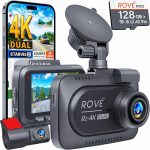
The modern road is a chaotic stage. From sudden lane changes and distracted drivers to the ever-present risk of hit-and-run accidents, having a reliable witness in your vehicle is no longer a luxury—it is a necessity. In 2026, dual-channel dash cameras have become the gold standard for driver protection, offering simultaneous recording of the road ahead and the cabin or rear window behind you. However, the prospect of running wires, hiding cables, and connecting to your car’s electrical system can feel intimidating for the average driver.
This guide is designed to demystify the entire process. Whether you are a complete novice or a seasoned DIY enthusiast, you will learn the exact steps to install a front and rear dash cam system professionally, safely, and without damaging your vehicle. We will cover everything from choosing the right mounting location to hardwiring the camera for a clean, permanent setup. By the end of this article, you will have the confidence to protect your vehicle with a professional-grade installation that looks factory-installed.
Pre-Installation: Gathering Tools and Understanding Your Kit
Before you touch a single wire, preparation is the key to a smooth installation. First, unpack your dash cam kit and verify all components are present. A standard 2026 dual-channel system should include the main front camera unit, the rear camera with a long connecting cable, a power adapter (typically a 12V cigarette lighter plug), a trim removal tool kit, and adhesive mounts. Do not skip reading the manual; different brands have unique wiring requirements, especially regarding the voltage of the rear camera cable.
Next, gather your essential tools. You will need a flathead and Phillips screwdriver, a plastic pry tool set (critical for avoiding scratches on your interior panels), a microfiber cloth to clean the glass, and zip ties for cable management. If you plan to hardwire the camera (highly recommended for a clean look), you will also need a hardwire kit, a fuse tap, a multimeter to test for constant and switched power, and a set of wire strippers. For 2026 models, many cameras now use USB-C power inputs, so ensure your hardwire kit is compatible.
Finally, choose your installation day wisely. Park your car in a shaded area or garage to prevent the interior from becoming too hot, which can make adhesive mounts less effective. Clean the windshield and rear window thoroughly with the microfiber cloth and isopropyl alcohol. This step is non-negotiable; any dust or oil residue will cause the camera mount to fail, potentially sending your expensive device crashing to the dashboard. Take a deep breath and lay out all your components on a clean towel on the passenger seat.
Mounting the Front Camera: Positioning for Optimal View
The front camera is the brain of your system, and its placement determines the quality of your footage. The ideal location is behind the rearview mirror, on the passenger side. This position keeps the camera out of your direct line of sight while maximizing the field of view across the hood and both lanes. In 2026, many vehicles have large sensor housings behind the mirror; you want to mount the camera just below or to the side of this housing to avoid a blind spot.
Before peeling the adhesive backing, perform a dry fit. Hold the camera against the glass and check the angle using the live view on your smartphone app or the camera’s built-in screen. Ensure the horizon is level and that the camera captures the entire width of the windshield, including the A-pillars. For vehicles with a steeply raked windshield, you may need to use a wedge-shaped adhesive pad to tilt the camera downward. Once satisfied, peel the 3M adhesive backing, press firmly against the glass for 30 seconds, and then attach the camera to the mount.
Route the power cable from the camera upward into the headliner. Use your plastic pry tool to gently tuck the cable into the gap between the headliner and the windshield. This gap is usually wide enough to hide the wire completely. Run the cable along the headliner toward the driver’s side A-pillar. Do not pull the cable taut; leave a small loop of slack near the camera to prevent tension on the connection. This step is critical for maintaining a reliable electrical connection over bumps and temperature changes.
Installing the Rear Camera: Cable Routing and Placement
The rear camera installation is the most labor-intensive part of the process, primarily due to the long cable run. For most sedans and SUVs, the best location is at the top center of the rear windshield, just below the rear wiper or the third brake light. For pickup trucks or vans, you may need to mount the camera on the rear window or, for a more permanent solution, on the license plate frame using a bracket. In 2026, wireless rear cameras are becoming more common, but wired systems still offer superior video quality and reliability.
Begin by routing the rear camera cable from the front unit. Tuck the cable along the same headliner path as the front power cable, but instead of stopping at the A-pillar, continue running it along the driver’s side door frame. Use your trim tool to push the cable behind the rubber weather stripping that runs along the door opening. This is the cleanest and safest route, as it keeps the cable away from the side curtain airbags. Do not run the cable across the floor mats, as it will be a tripping hazard and can be damaged by seat tracks.
As you reach the rear of the vehicle, you will need to navigate the cable around the rear seat. For SUVs and hatchbacks, you can often run the cable through the rubber conduit that connects the car body to the rear hatch. This is the trickiest part; you may need to use a stiff wire or a coat hanger to fish the cable through the conduit. For sedans, the cable will exit the weather stripping and tuck into the rear deck lid. Mount the rear camera to the glass using the same cleaning and pressing technique as the front. Connect the cable, and test the rear view on the front unit before securing all the trim panels back into place.
Hardwiring for Power: The Professional Touch (2026 Guide)
While plugging into the cigarette lighter socket works, it leaves an ugly dangling wire and occupies your only 12V port. Hardwiring your dash cam is the hallmark of a professional installation. In 2026, most vehicles have a fuse box located under the dashboard on the driver’s side or inside the glove compartment. You will need a hardwire kit that includes a voltage regulator, as dash cams operate on 5V, not the car’s 12V system. Never cut the original power cable to splice it directly into the car’s wiring.
First, use your multimeter to identify two types of fuses in your fuse box: a constant power fuse (always on, even when the car is off) and a switched power fuse (only on when the ignition is on). The constant power is used for parking mode, while the switched power tells the camera when to turn on and off. Common switched fuses include those for the cigarette lighter, radio, or windshield wipers. Common constant fuses include the interior lights or door locks. Use a fuse tap for each circuit; this is a safe adapter that plugs into the fuse slot and provides a new circuit without damaging the factory wiring.
Connect the hardwire kit’s red wire to the switched fuse tap and the yellow wire to the constant fuse tap. Connect the black ground wire to a bare metal bolt on the chassis—look for a bolt near the fuse box that is screwed directly into the car’s metal frame. Scrape away any paint to ensure a solid ground connection. Plug the hardwire kit’s USB or barrel connector into the dash cam. Turn on the ignition; the camera should power on. Turn off the ignition; the camera should enter parking mode or turn off after a delay. Tuck all excess wiring into the fuse box cavity and replace the cover.
Final Setup, Testing, and Parking Mode Configuration
With the hardware installed, the final step is software configuration. Insert a high-endurance microSD card (rated for continuous recording, Class 10 or U3). In 2026, many dash cams support 256GB or larger cards, which can hold days of footage. Power on the system and format the card inside the camera itself. This ensures the file system is optimized for the camera’s firmware. Next, adjust the video resolution. For a dual system, set the front to 4K and the rear to 1080p for the best balance of detail and storage efficiency.
Enable parking mode if your hardwire kit supports it. This feature allows the camera to monitor your car while parked, using motion detection or impact sensors. Configure the sensitivity to medium; too high, and you will get false alerts from passing trucks or wind. Too low, and you might miss a door ding. Also, set the G-sensor sensitivity for driving mode to low or medium to prevent the camera from locking every bump in the road, which can fill your memory card with protected files.
Finally, perform a road test. Drive for 10 minutes and then review the footage on your smartphone or by removing the SD card. Check that the front footage is clear, the license plates are readable during the day, and the rear camera has a stable image without flickering. Adjust the exposure settings if the footage is too bright or too dark. Once everything is perfect, secure any loose trim panels and enjoy the peace of mind that comes with a professionally installed dash cam system.
Key Takeaways
- ✓ Always clean the mounting surface with isopropyl alcohol before applying adhesive to prevent the camera from falling.
- ✓ Route cables along the headliner and door weather stripping to keep them hidden and away from airbags.
- ✓ Hardwiring using a fuse tap is the only way to enable parking mode and eliminate dangling power cords.
- ✓ Use a multimeter to correctly identify switched and constant power fuses before connecting the hardwire kit.
- ✓ Format the microSD card inside the camera and adjust G-sensor sensitivity to avoid false file locks.
Frequently Asked Questions
Do I need to disconnect my car battery before hardwiring a dash cam?
While not strictly required for a simple fuse tap installation, disconnecting the negative battery terminal is a best practice for safety. It prevents accidental short circuits and protects the car’s sensitive electronics. If you are uncomfortable working near live fuses, disconnect the battery and wait 10 minutes for the airbag system capacitors to discharge.
Will a dash cam drain my car battery overnight?
Only if you use parking mode without a voltage cutoff. A quality hardwire kit includes a low-voltage protection feature that automatically shuts off the camera when the battery voltage drops to a preset level (usually 11.8V or 12.0V). This ensures your car will always have enough power to start the engine. Without this feature, a camera can drain a standard lead-acid battery in 12-24 hours.
Can I install a rear dash cam on a car with a trunk instead of a hatchback?
Yes, but the installation is different. For a sedan, you typically mount the rear camera on the rear windshield inside the cabin. The cable runs from the front, along the door sills, and then up the rear seat back to the rear deck. You may need to remove the rear seat cushion to route the cable cleanly. Some users prefer a license plate mount for a sedan, but this requires drilling or using a bracket.
What is the best microSD card for a 2026 dual-channel dash cam?
You should use a High Endurance or Max Endurance microSD card from a reputable brand like SanDisk or Samsung. These cards are designed to handle the constant overwriting and heat generated by dash cams. A standard card will fail quickly. For a 4K front and 1080p rear system, a 128GB or 256GB card is recommended to store several days of continuous footage.
How do I hide the cable when running it to the rear of a minivan or large SUV?
For large vehicles, the best method is to remove the interior trim panels. Use a trim removal tool to pop off the plastic panels along the roofline. Run the cable inside the cavity and replace the panels. For the rear hatch, you must feed the cable through the rubber boot (conduit) that connects the body to the hatch. This requires patience and a lubricant like silicone spray to slide the cable through.
Conclusion
Installing a front and rear dash cam in 2026 is a straightforward weekend project that delivers immense long-term value. By following the steps outlined in this guide—from careful mounting and hidden cable routing to professional hardwiring and software configuration—you have transformed your vehicle into a rolling surveillance system. You now have irrefutable evidence in the event of an accident, protection against insurance fraud, and the ability to capture unexpected moments on the road.
Do not let the fear of complexity stop you from taking this important step. Start by gathering your tools, watching a few model-specific videos online, and tackling the front camera first. Once you see how clean the installation looks, you will be motivated to finish the rear camera. Your future self will thank you when a critical moment is captured in crystal-clear detail. Take the first step today and order your dash cam kit—your safety on the road is worth the effort.

Tony Kilmer is an auto mechanic and the author behind CarTruckAdvisor.com. He shares practical, no-nonsense guidance on car and truck maintenance, common problems, and repair decisions—helping drivers understand what’s going on and what to do next.