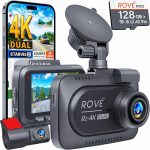
You are driving down the highway when a car suddenly swerves into your lane, forcing you to slam on the brakes. In the split second that follows, you realize you have no proof of what just happened. This scenario plays out thousands of times every day, and without a dash cam, your word is often the only evidence you have. In 2026, dash cams have evolved from niche gadgets into essential safety equipment, offering features like 4K resolution, night vision, and cloud connectivity that can protect you from insurance fraud, accidents, and even theft.
Installing a dash cam might seem intimidating, especially with the maze of wires and suction cups involved, but the process is far simpler than most people think. This guide will walk you through every step of the installation, from choosing the right camera to hiding the cables for a professional finish. Whether you are a complete beginner or someone who has tried and failed before, you will learn exactly how to install a dash cam in your car safely, legally, and effectively. By the end, you will have a fully operational system that records every mile you drive.
Choosing the Right Dash Cam and Tools for Your Vehicle
Before you even touch your car, you need to select a dash cam that matches your needs and your vehicle’s layout. In 2026, the market offers three main types: single-channel cameras that record only the front, dual-channel systems that capture both front and rear views, and multi-channel setups for vans or SUVs that also cover the cabin. For most drivers, a dual-channel camera is the best investment because it provides complete coverage of your surroundings. Look for models with at least 1080p resolution on both channels, a wide-angle lens of 140 degrees or more, and a capacitor-based power system instead of a battery, as capacitors handle extreme temperatures much better.
You will also need a few basic tools to complete the installation. The essential items include a plastic trim removal tool kit, which costs around ten dollars and prevents you from scratching your interior panels. You will also need a microfiber cloth to clean your windshield, a fuse tap kit if you plan to hardwire the camera, and a set of zip ties to manage excess cable. Some dash cams come with a hardwiring kit in the box, but many do not, so check the specifications before you buy. If you are using the cigarette lighter adapter, you will only need the trim tools and cloth, making the process even simpler.
Finally, consider where you will mount the camera. The ideal location is behind the rearview mirror on the passenger side, as this position gives you a clear view of the road without obstructing your vision. Avoid placing the camera too low on the dashboard, as this can cause glare and reduce the field of view. Also, check your local laws regarding dash cam placement; in some regions, you cannot mount anything on the windshield that blocks more than a small area. Once you have your camera and tools ready, you are prepared for the actual installation.
Preparing Your Car and Positioning the Camera
The first step in any dash cam installation is preparing the mounting surface. Your windshield must be completely clean and dry, as any dust or grease will prevent the adhesive mount from sticking properly. Use the microfiber cloth with a small amount of isopropyl alcohol to wipe the area where the mount will go. Pay special attention to the edges of the glass, as these areas often accumulate residue from windshield treatments. Let the alcohol evaporate completely for about two minutes before proceeding. This simple step is the difference between a mount that stays in place for years and one that falls off on a hot summer day.
Next, test the camera’s position before you stick anything permanently. Hold the camera up to the windshield behind the rearview mirror and check the angle using the camera’s live view on your smartphone app or built-in screen. Adjust the camera so that the horizon line is roughly one-third of the way from the top of the frame, and ensure you can see both the left and right edges of your hood. If you have a dual-channel system, also check that the rear camera cable will reach the back of your car without being stretched tight. Most rear cameras come with a cable that is 16 to 20 feet, which is sufficient for sedans and SUVs but may be tight for larger vehicles like minivans.
Once you are satisfied with the position, peel the protective film off the adhesive mount and press it firmly against the windshield. Hold it in place for thirty seconds to ensure a strong bond. Then, slide the camera onto the mount until you hear a click. Do not connect the power cable yet; you will route the cable first to keep everything tidy. If your camera uses a suction cup mount instead of adhesive, wet the suction cup slightly with water before pressing it to the glass. This creates a better seal and prevents the cup from popping off during sudden stops or hot weather.
Routing the Power Cable for a Clean, Hidden Installation
The most intimidating part of installing a dash cam is hiding the power cable, but it is actually quite straightforward once you understand your car’s interior layout. Start by plugging the power cable into the camera, then tuck the excess cable into the headliner, which is the fabric covering the roof. Use your trim removal tool to gently push the cable into the gap between the headliner and the windshield. Most cars have enough space here to hide the cable completely without any tools. Run the cable along the top edge of the windshield toward the driver’s side or passenger’s side pillar, depending on where your power source is located.
When you reach the A-pillar, which is the vertical support between the windshield and the front door, you need to be careful. Many modern cars have airbags hidden inside the A-pillar, and you must route the cable behind the airbag, not in front of it. do this, gently pry off the A-pillar trim panel using your trim tool. You will see the folded airbag inside. Route the cable behind the airbag and behind the trim panel, then snap the panel back into place. If you are unsure about this step, consult your vehicle’s manual or watch a model-specific video online. Routing the cable incorrectly can interfere with airbag deployment, which is a serious safety risk.
From the A-pillar, continue running the cable down toward the dashboard. You can tuck it under the rubber weatherstripping along the door frame, which is designed to hold cables securely. Work your way down to the fuse box, which is usually located under the dashboard on the driver’s side, or to the cigarette lighter socket. If you are using the cigarette lighter, simply plug the cable in and tuck the remaining slack under the dashboard or floor mat. For a hardwired installation, you will connect the cable to the fuse box using a fuse tap, which we will cover in the next section. The key is to keep the cable hidden at every step, using trim tools to push it into gaps and zip ties to secure loose sections.
Hardwiring Your Dash Cam for 24/7 Parking Mode
Hardwiring your dash cam is the best way to ensure it runs continuously, even when your car is parked. This setup allows the camera to record motion or impact events while you are away, which is invaluable for catching hit-and-run drivers or vandalism. To hardwire, you will need a hardwiring kit that a fuse tap, a ground connector, and a voltage regulator. The voltage regulator is critical because it prevents the camera from draining your car battery below a safe level, typically cutting power at 11.8 volts. Start by locating your car’s fuse box; most vehicles have one under the dashboard and another under the hood. For dash cams, the interior fuse box is usually easier to access.
Identify a fuse that provides constant power, meaning it stays on even when the ignition is off. Common choices include the interior light fuse, the door lock fuse, or the power window fuse. Use a test light or multimeter to confirm which fuses are constant and which are. You will also need a switched fuse for the parking mode feature, which tells the camera when the car is off. Once you have identified the correct fuses, remove them with the fuse puller tool included in your hardwiring kit. Insert the fuse tap into the empty slot, then plug the original fuse and the dash cam fuse into the tap. The dash cam fuse should be rated at 5 amps or as specified by your camera’s manual.
Connect the ground wire from the hardwiring kit to a bare metal bolt on the car’s chassis. Look for a bolt near the fuse box that is not painted or coated, as paint will prevent a proper ground connection. Loosen the bolt, wrap the ground wire around it, and tighten it securely. Finally, plug the hardwiring kit’s connector into your dash cam and test the system. Turn the ignition on and off to confirm that the camera switches between driving mode and parking mode correctly. If everything works, tuck the remaining wires into the dashboard and replace any trim panels you removed. This installation takes about an hour but provides a permanent, professional solution that eliminates dangling cables.
Configuring Your Dash Cam Settings and Performing a Final Test
With the physical installation complete, it is time to configure your dash cam’s software settings. Most modern dash cams connect to a smartphone app via Wi-Fi or Bluetooth, allowing you to adjust settings without fiddling with tiny buttons on the device. Start by setting the date and time correctly, as this timestamp is crucial for insurance claims and legal evidence. Next, enable loop recording, which automatically overwrites the oldest footage when the memory card is full. Set the loop length to three minutes, as this provides a good balance between file size and ease of finding specific events. Also, enable G-sensor sensitivity to medium, which will automatically lock and save footage when the camera detects a collision or sudden movement.
Format your memory card inside the camera before using it for the first time. This ensures the file system is compatible and reduces the risk of corruption. In 2026, a 128GB high-endurance microSD card is the standard recommendation, as it can hold roughly 10 to 15 hours of 4K footage. High-endurance cards are designed to withstand the constant rewriting that dash cams require, unlike standard cards that may fail after a few months. If your camera supports cloud storage, set up the Wi-Fi connection and configure the upload settings so that important clips are saved off-device automatically.
Finally, perform a road test to verify everything is working. Drive for about ten minutes on a mix of roads, then park and check the footage on your phone or computer. Look for clear video quality, proper exposure in bright and dark areas, and correct audio recording if you enabled that feature. Also, test the parking mode by shaking your car gently or walking past it to trigger the motion sensor. If the camera does not respond, double-check your hardwiring connections and the G-sensor settings. Once you confirm that the system is recording reliably, you can enjoy the peace of mind that comes with having a permanent witness on every drive.
Key Takeaways
- ✓ Choose a dual-channel dash cam with at least 1080p resolution and a capacitor-based power system for reliability in extreme temperatures.
- ✓ Clean the windshield thoroughly with isopropyl alcohol before mounting the camera to ensure a strong, long-lasting adhesive bond.
- ✓ Route the power cable behind the A-pillar trim and behind the airbag to maintain safety and achieve a hidden, professional look.
- ✓ Hardwire the dash cam using a fuse tap and voltage regulator to enable 24/7 parking mode without draining your car battery.
- ✓ Format a high-endurance microSD card inside the camera and test all settings, including loop recording and G-sensor sensitivity, before relying on the system.
Frequently Asked Questions
it legal to install a dash cam on my windshield?
Yes, dash cams are legal in most countries, but there are restrictions on placement. In the United States, federal regulations prohibit mounting anything on the windshield that blocks more than a small area, typically a 5-inch square in the driver’s lower corner. Many states allow mounting behind the rearview mirror, as this area is considered part of the rearview mirror assembly. In Europe, laws vary by country; for example, Germany requires the camera to be mounted in a way that does not obstruct the driver’s view. Always check your local traffic laws before installation.
Can I install a dash cam myself, or do I need a professional?
You can absolutely install a dash cam yourself, even if you have no prior experience. The basic installation using the cigarette lighter adapter takes about 20 minutes and requires only a trim tool and a cloth. Hardwiring is more complex but still manageable for a DIY enthusiast with basic knowledge of car electronics. If you are uncomfortable working near airbags or fuse boxes, many car audio shops and electronics retailers offer installation services for around $50 to $100. However, following this guide step by step will give you a professional result at no extra cost.
How do I prevent my dash cam from draining my car battery?
The key is to use a hardwiring kit with a built-in voltage regulator. This device monitors your battery voltage and automatically cuts power to the dash cam when the voltage drops below a safe level, usually around 11.8 volts. This ensures your car can still start even after the camera has been recording in parking mode for several hours. If you are using the cigarette lighter socket, the camera will only run when the ignition is on, so battery drain is not an issue. For 24/7 recording, always invest in a quality hardwiring kit with low-voltage protection.
What size memory card do I need, and how often should I replace it?
A 128GB high-endurance microSD card is the sweet spot for most users in 2026. It stores roughly 10 to 15 hours of 4K footage or 20 to 30 hours of 1080p footage before overwriting old files. High-endurance cards are specifically designed for dash cams and can handle the constant rewriting cycle for two to three years. You should replace the card every 12 to 18 months as a preventative measure, as all flash memory degrades over time. Always format the new card inside the camera before first use to ensure compatibility.
My dash cam keeps falling off the windshield in hot weather. What can I do?
A This is a common issue with suction cup mounts and low-quality adhesive pads. First, ensure you cleaned the windshield with isopropyl alcohol before mounting. If you are using a suction cup, wet it slightly with water before pressing it to the glass. For adhesive mounts, consider upgrading to a high-temperature 3M VHB tape, which is rated for extreme heat. Some dash cams also offer alternative mounting options, such as a rearview mirror bracket that clips onto your existing mirror stem, completely avoiding the windshield. If all else fails, a small drop of super glue on the adhesive pad can provide a permanent solution, but this makes removal difficult.
Conclusion
Installing a dash cam in your car is one the most practical upgrades you can make for your safety and peace of mind. From choosing the right camera and tools to routing cables and configuring settings, each step is designed to give you a reliable recording system that works in all conditions. Whether you opt for a simple plug-and-play setup or a fully hardwired system with parking mode, the process is accessible to anyone willing to spend an hour or two working in their driveway. The result is a permanent witness that protects you from false claims, captures memorable road trips, and provides crucial evidence in the event of an accident.
Now that you have the knowledge, the next step is action. Gather your tools, order your dash cam if you have not already, and set aside an afternoon for the installation. Start with the basic setup using the cigarette lighter if you want to test the waters, then upgrade to hardwiring later if you need parking mode. Remember to check your footage regularly and format your memory card every few months to maintain performance. With your new dash cam installed and configured, you can drive with confidence knowing that every mile is recorded and every moment is documented.

Tony Kilmer is an auto mechanic and the author behind CarTruckAdvisor.com. He shares practical, no-nonsense guidance on car and truck maintenance, common problems, and repair decisions—helping drivers understand what’s going on and what to do next.