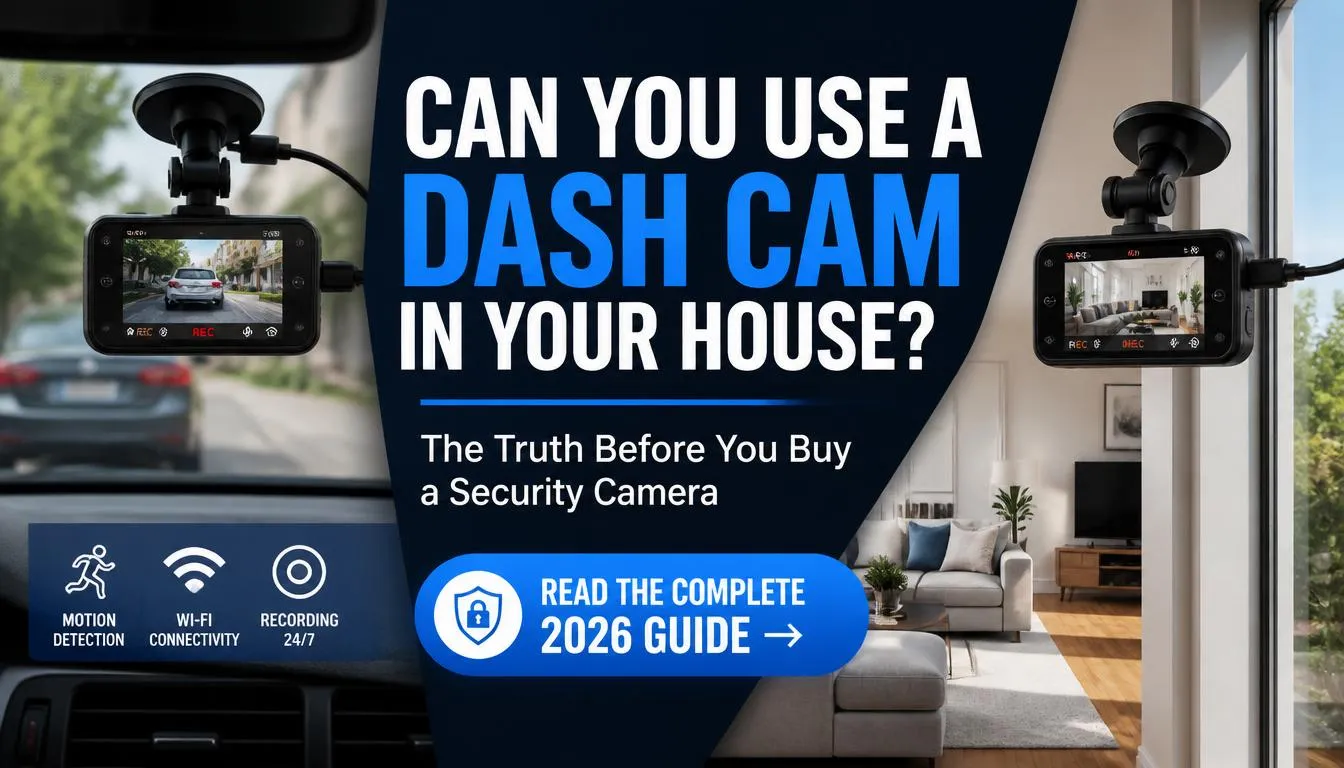
Yes, you can use a dash cam in your house, and it can be a practical solution for temporary indoor monitoring, pet surveillance, or keeping an eye on deliveries. However, while a dash cam can work as a basic indoor security camera, it has limitations compared to a dedicated home security system, especially for 24/7 monitoring, smart alerts, and cloud storage.
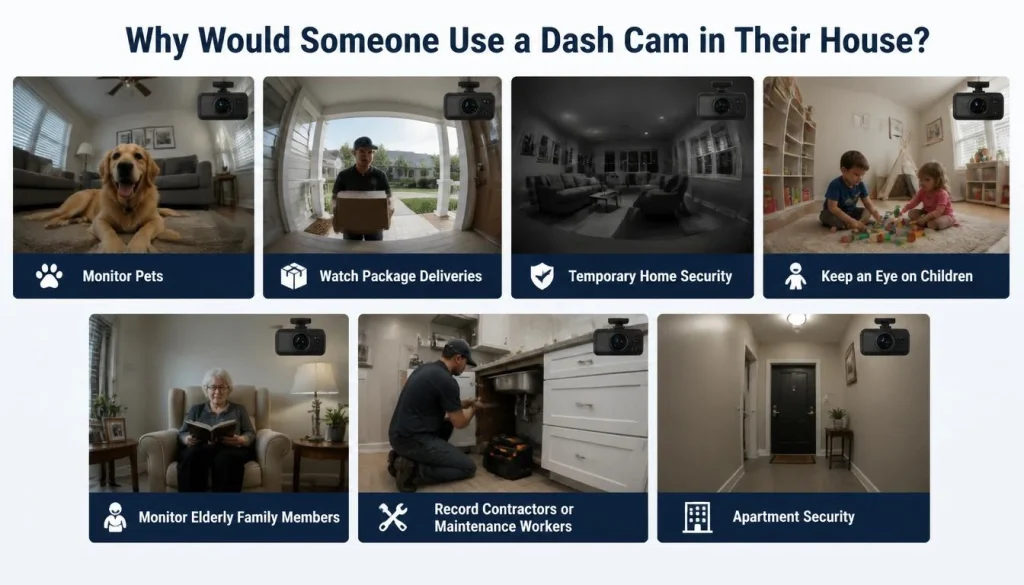
Why Would Someone Use a Dash Cam in Their House?
Although dash cams are designed for vehicles, many people discover they can also be useful inside the home. If you already own a dash cam, using it indoors can save money and provide basic security without purchasing another device.
Here are some common reasons people choose to use a dash cam at home:
Monitor Pets
Many pet owners use an old dash cam to watch their dogs or cats while they’re at work. Motion detection can help capture your pet’s activities throughout the day.
Watch Package Deliveries
If your front door is visible from a window, a dash cam can record delivery drivers, package drop-offs, and unexpected visitors.
Temporary Home Security
If you’re moving into a new house or apartment and haven’t installed security cameras yet, a dash cam can provide temporary surveillance.
Keep an Eye on Children
Parents sometimes use a dash cam to monitor a playroom or check on older children while working in another part of the house.
Monitor Elderly Family Members
A dash cam can help you review activity if you’re caring for an aging parent or family member, although dedicated monitoring devices are usually a better long-term option.
Record Contractors or Maintenance Workers
If you’re having repairs done while you’re away, a dash cam can document work inside your home.
Apartment Security
Renters who cannot permanently install security cameras often use portable dash cams because they don’t require drilling holes or complicated wiring.
Can a Dash Cam Work Without a Car?
Yes. A dash cam doesn’t actually require a vehicle to operate. It simply needs a stable power source.
Most dash cams run on:
- USB power
- A wall USB charger
- A 12V power adapter
- A portable power station
- A large power bank (for temporary use)
Once connected to continuous power, the dash cam records just like it would inside a vehicle.
The only thing a car normally provides is electricity. Everything else including recording video, saving footage, loop recording, and motion detection works independently.
Can You Use a Dash Cam as a Security Camera?
The short answer is yes but with some important limitations.
A dash cam can act as a basic indoor security camera if you need:
- Temporary monitoring
- Basic video recording
- Motion-triggered recording
- Evidence after an incident
- Budget-friendly surveillance
However, it cannot fully replace a modern home security camera in most situations.
Dedicated indoor security cameras usually offer:
- Instant smartphone alerts
- Cloud backups
- Two-way audio
- Smart AI person detection
- Remote control
- Multi-camera management
- Better night vision
If your goal is simply to monitor one room for a few days or weeks, a dash cam can work surprisingly well.
If you want long-term home protection, a dedicated indoor security camera is the better investment.
My Experience Using a Dash Cam Indoors
A while ago, I tested an older dash cam in my home instead of buying another security camera.
The setup took less than ten minutes. I plugged it into a USB wall charger, placed it on a bookshelf facing the front door, and enabled loop recording with motion detection.
During the daytime, the video quality was excellent. It clearly recorded visitors, package deliveries, and anyone entering the room.
At night, however, the results depended on the available lighting. In a well-lit room, recordings remained clear. In complete darkness, the footage became much less useful because the dash cam lacked infrared night vision.
The biggest lesson I learned was that continuous power is essential. The built-in battery only lasted a short time, so keeping the camera plugged in made a huge difference.
For temporary indoor monitoring, I found the setup surprisingly effective. For permanent home security, though, I would still choose a dedicated security camera.
What Do You Need to Use a Dash Cam Indoors?
Setting up a dash cam inside your home doesn’t require expensive equipment.
Here’s what you’ll typically need.
1. Dash Cam
Any working dash cam can be used, although models with Wi-Fi, parking mode, and motion detection perform better.
2. USB Power Adapter
Most modern dash cams accept USB power, making them easy to plug into a standard wall outlet.
3. High-Endurance microSD Card
Because the camera records continuously, using a high-quality endurance memory card helps reduce recording errors and extends the card’s lifespan.
4. Stable Mount
Depending on where you place the camera, you can use:
- Suction cup
- Adhesive mount
- Small tripod
- Shelf mount
5. Optional Wi-Fi Connection
Wi-Fi isn’t required for recording, but it makes transferring videos and changing settings much easier.
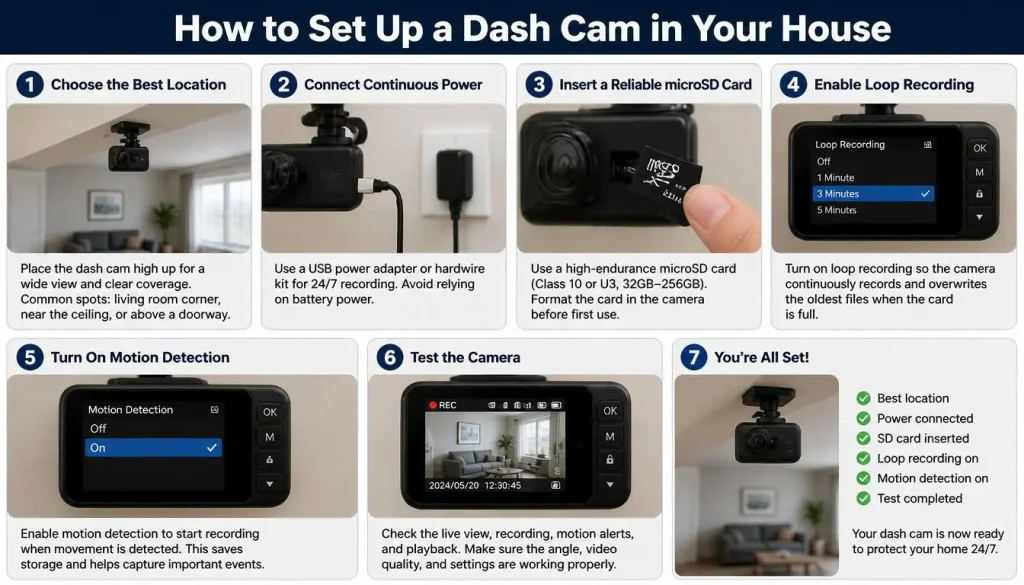
How to Set Up a Dash Cam in Your House
Setting up a dash cam indoors is straightforward.
Step 1: Choose the Best Location
Pick a place with a clear view of the area you want to monitor.
Examples include:
- Front entrance
- Living room
- Hallway
- Garage
- Home office
Avoid pointing the camera directly at bright windows, which can reduce image quality.
Step 2: Connect Continuous Power
Instead of relying on the internal battery, plug the dash cam into:
- USB wall charger
- USB power adapter
- Portable power station
Continuous power ensures uninterrupted recording.
Step 3: Insert a Reliable microSD Card
Install a high-endurance memory card before recording.
Choose a card from a trusted manufacturer designed for continuous video recording.
Step 4: Enable Loop Recording
Loop recording automatically overwrites the oldest files when storage becomes full.
Without this feature, recording stops once the memory card reaches capacity.
Step 5: Turn On Motion Detection
If your dash cam supports motion detection, enable it.
This reduces unnecessary recordings and saves storage space.
Step 6: Test the Camera
Walk through the room several times and review the footage.
Make sure the camera captures:
- Faces clearly
- Doorways
- Important activity zones
Adjust the camera angle if needed.
Best Places to Put a Dash Cam Inside Your Home
Choosing the right location significantly improves recording quality.
Front Door
Ideal for recording deliveries and visitors.
Living Room
Useful for monitoring family activity or pets.
Garage
Helps record anyone entering through the garage.
Apartment Entrance
Provides basic apartment security without permanent installation.
Home Office
Can document expensive equipment or monitor workspaces.
Nursery
Some parents temporarily use a dash cam to observe a sleeping baby, although a dedicated baby monitor offers more features.
Pet Room
A great option for checking on dogs or cats while you’re away.
Can a Dash Cam Record 24/7 at Home?
Yes, but only if it receives continuous power.
The small internal battery found in most dash cams is designed to safely save recordings after power loss—not to provide hours of operation.
For nonstop recording, you’ll need:
- USB wall charger
- Continuous power source
- Loop recording enabled
- A reliable memory card
Also remember that continuous recording creates more heat than occasional recording. Keep the camera in a well-ventilated location and avoid placing it in direct sunlight or near heating vents.
Can a Dash Cam Record Without Wi-Fi?
Yes.
A dash cam does not need Wi-Fi to record video.
Everything is saved directly onto the microSD card.
Without Wi-Fi, you can still:
- Record video
- Save footage
- Use loop recording
- Enable motion detection
- Review recordings directly on the device or by removing the memory card
Wi-Fi mainly adds convenience by allowing you to connect your smartphone for settings changes and file transfers.
Can a Dash Cam Record Without Internet?
Yes.
This is one of the biggest misconceptions among new users.
A dash cam does not require an internet connection to function.
Even if your home internet goes offline, the camera can continue recording as long as:
- Power remains available
- A memory card is installed
- Recording is enabled
Internet access only becomes necessary for features such as cloud backups, remote viewing, firmware updates, or app-based notifications on models that support those functions.
Can You Watch a Dash Cam Live on Your Phone?
It depends on the dash cam model.
Many modern dash cams include built-in Wi-Fi that lets you connect your smartphone directly to the camera using the manufacturer’s app. This makes it easy to preview the live view, adjust settings, and download recordings without removing the microSD card.
However, it’s important to understand the difference between Wi-Fi connectivity and remote viewing.
Local Wi-Fi Viewing
Most Wi-Fi dash cams allow you to:
- Watch a live preview while you’re near the camera
- Download recorded videos
- Change camera settings
- Format the memory card
- Update firmware
Remote Viewing
Only a small number of premium dash cams support remote viewing over the internet through a cloud service or LTE connection.
If your goal is to check your home while you’re at work or traveling, a dedicated indoor security camera is usually a better choice.
Best Dash Cam Features for Home Use
Not every dash cam performs equally well indoors. If you’re planning to use one in your house, these features make the biggest difference.
Motion Detection
The camera starts recording when movement is detected, helping save storage space.
Parking Mode
Originally designed for parked vehicles, parking mode can also be useful indoors because it records activity when motion or impact is detected.
Loop Recording
Automatically overwrites the oldest files when the memory card is full, allowing continuous recording without manual file deletion.
Wi-Fi Connectivity
Makes it much easier to transfer videos and adjust settings from your smartphone.
Good Low-Light Performance
A camera with HDR or a larger image sensor generally records clearer footage in dim rooms.
Wide-Angle Lens
A viewing angle between 140° and 170° captures more of the room without needing multiple cameras.
Best Dash Cam Settings for Indoor Use
A few simple adjustments can noticeably improve indoor recording quality.
| Setting | Recommended Value |
|---|---|
| Resolution | 1080p or 1440p |
| Loop Recording | On |
| Motion Detection | On |
| Parking Mode | On (if supported) |
| G-Sensor | Low or Off |
| Audio Recording | Based on your privacy needs |
| Exposure | Auto |
If your camera records too many unnecessary clips, lower the motion sensitivity slightly.
Storage Requirements for Indoor Recording
The amount of storage you need depends on the recording resolution and whether you use continuous or motion-triggered recording.
| microSD CardApproximate Recording Time (1080p) | |
|---|---|
| 32GB | 3–5 hours |
| 64GB | 6–10 hours |
| 128GB | 12–20 hours |
| 256GB | 24–40+ hours |
These numbers vary depending on video bitrate and compression.
For daily indoor monitoring, a 128GB High Endurance microSD card is an excellent balance between capacity and reliability.
Can a Dash Cam Record Audio Indoors?
Yes.
Most dash cams include a built-in microphone that records audio along with video.
This can be useful for:
- Recording conversations during an incident
- Monitoring unusual sounds
- Providing additional evidence if something happens
However, recording audio may have legal implications depending on where you live.
Before enabling audio recording, check the privacy and consent laws that apply in your country or state.
If you’re unsure, it’s often safer to disable audio and record video only.
Can a Dash Cam Record Through a Window?
Yes, but the results depend on lighting conditions.
During the day, a dash cam can often record through a clean window with acceptable image quality.
At night, reflections from indoor lights can make outside objects difficult to see.
For the best results:
- Turn off indoor lights when possible
- Place the camera close to the glass
- Keep the window clean
- Avoid aiming directly toward bright light sources
Pros and Cons of Using a Dash Cam in Your House
Advantages
- Affordable if you already own a dash cam
- Easy to install
- Portable
- No permanent mounting required
- Good HD video quality
- Useful for temporary monitoring
- Can monitor pets, deliveries, or visitors
Disadvantages
- Limited smart features
- Usually no cloud storage
- Short battery life
- Limited remote access
- Not designed specifically for indoor security
- Night performance varies by model
Dash Cam vs Home Security Camera
| Feature | Dash Cam | Home Security Camera |
|---|---|---|
| Indoor Recording | Yes | Yes |
| Designed for Home Use | No | Yes |
| Motion Alerts | Limited | Excellent |
| Cloud Storage | Rare | Common |
| Remote Viewing | Limited | Yes |
| Two-Way Audio | Rare | Common |
| AI Detection | Rare | Common |
| Easy Temporary Setup | Excellent | Good |
| Best for Long-Term Security | No | Yes |
Verdict: A dash cam is a practical temporary solution, but a dedicated home security camera is the better long-term choice.
Dash Cam vs Indoor Wi-Fi Camera
| Feature | Dash Cam | Indoor Wi-Fi Camera |
|---|---|---|
| Video Quality | Excellent | Excellent |
| Smartphone Notifications | Limited | Yes |
| Cloud Backup | Rare | Yes |
| Remote Access | Limited | Yes |
| Smart Home Integration | Rare | Excellent |
| Ease of Indoor Use | Moderate | Excellent |
If you frequently monitor your home while away, an indoor Wi-Fi camera provides a much better experience.
Dash Cam vs Baby Monitor
| Feature | Dash Cam | Baby Monitor |
|---|---|---|
| Video Monitoring | Yes | Yes |
| Night Vision | Depends on Model | Usually Excellent |
| Cry Detection | No | Yes |
| Temperature Monitoring | No | Often Included |
| Two-Way Audio | Rare | Common |
While a dash cam can temporarily monitor a nursery, a dedicated baby monitor includes features specifically designed for infant safety.
Who Should Use a Dash Cam at Home?
Using a dash cam indoors makes the most sense for:
- Apartment renters
- Students
- Pet owners
- Travelers
- People between homes
- Homeowners needing temporary surveillance
- Anyone looking for a low-cost monitoring solution
If you need permanent security with remote access and smart alerts, a dedicated security camera is a better investment.
Privacy and Legal Considerations
Before recording inside your home, keep these points in mind.
- Recording inside your own home is generally legal.
- Guests should have a reasonable expectation of privacy in areas such as bathrooms and bedrooms.
- Audio recording laws differ by country and state.
- Some locations require everyone involved in a conversation to consent before audio is recorded.
- If you rent your home, review your lease agreement before installing monitoring equipment in shared areas.
When in doubt, prioritize privacy and use the camera responsibly.
Common Problems and Troubleshooting
Dash Cam Keeps Turning Off
Possible causes:
- Weak USB charger
- Faulty cable
- Insufficient power output
Try using a higher-quality power adapter.
Motion Detection Doesn’t Work
- Increase sensitivity.
- Clean the camera lens.
- Update the firmware.
- Ensure motion detection is enabled.
SD Card Fills Up Quickly
Enable loop recording or upgrade to a larger High Endurance microSD card.
Poor Night Recording
Improve room lighting or move the camera closer to the monitored area.
Camera Overheats
Keep the dash cam away from direct sunlight and ensure proper airflow around the device.
Parking Mode Doesn’t Activate
Some models require a dedicated hardwire kit or specific power mode before parking mode becomes available.
Common Mistakes to Avoid
Avoid these common errors when using a dash cam indoors.
- Using a low-quality memory card
- Blocking ventilation around the camera
- Relying only on the internal battery
- Pointing the camera directly at bright windows
- Forgetting to test recordings
- Disabling loop recording
- Mounting the camera where it can easily fall
- Ignoring firmware updates
Taking a few minutes to set up the camera properly can prevent many recording problems later.
Frequently Asked Questions on Can I Use a Dash Cam in My House
Can I use any dash cam inside my house?
Yes. Most dash cams can be used indoors as long as they have continuous power and a memory card.
Can a dash cam replace a home security camera?
For temporary monitoring, yes. For long-term home security, a dedicated security camera offers more features and better reliability.
Can I leave a dash cam recording all day?
Yes, provided it has a stable power source and loop recording is enabled.
Does a dash cam need Wi-Fi?
No. Wi-Fi is optional and mainly makes it easier to transfer videos and adjust settings.
Does a dash cam need internet access?
No. Internet is only required for cloud features or remote viewing on supported models.
Can I monitor my pets with a dash cam?
Yes. Many pet owners use dash cams to monitor dogs and cats while they’re away.
Can I connect a dash cam to a power bank?
Yes. A large-capacity power bank can operate many dash cams for several hours, making it useful during temporary power outages or in locations without a nearby outlet.
Can a dash cam replace CCTV?
Not completely. A dash cam can provide basic indoor monitoring, but CCTV and modern home security systems offer continuous surveillance, remote access, cloud storage, and advanced detection features.
Is it legal to record inside my home?
In most places, recording video inside your own home is legal. However, audio recording laws and privacy regulations vary, so always check the rules that apply where you live.
Final Verdict
Yes, you can use a dash cam in your house, and for many people, it’s a practical way to monitor pets, record deliveries, or add temporary indoor security without buying new equipment.
That said, a dash cam works best as a short-term or budget-friendly solution. While it offers high-quality video recording and easy setup, it lacks many of the smart features found in dedicated home security cameras, such as cloud storage, AI detection, instant alerts, and reliable remote viewing.
If you already own a dash cam and need basic indoor monitoring, it’s absolutely worth trying. Just remember to use continuous power, install a high-endurance microSD card, enable loop recording, and place the camera where it has a clear view of the area you want to protect.
For homeowners seeking 24/7 surveillance, remote access, and long-term peace of mind, investing in a purpose-built indoor security camera remains the better choice.

Tony Kilmer is an auto mechanic and the author behind CarTruckAdvisor.com. He shares practical, no-nonsense guidance on car and truck maintenance, common problems, and repair decisions—helping drivers understand what’s going on and what to do next.