

Image source: Bing (Web (fair-use with source credit))
You’re parked somewhere unfamiliar and suddenly wonder whether you can use a power bank for dash cam duty. The short answer is yes. A portable charger can run your camera just fine, and the whole idea isn’t as risky as it sounds.
But the devil lives in the details. Wire things up wrong and you could lose your car battery, fry your dash cam, or invite a thermal event into a metal box full of fuel.
Our research across manufacturer specifications, user reports, and safety data shows that dash cams typically pull between 5 and 12 watts while recording actively, then drop to roughly 1 to 3 watts in parking mode. Power banks vary wildly in build quality, cell chemistry, and protection circuitry. Matching the two correctly requires a little basic electrical literacy and a healthy respect for what happens when cheap lithium cells get stressed.
Let’s walk through the full picture so you can set this up safely and actually sleep soundly.
Quick Answer: Can You Power a Dash Cam With a Power Bank?
Yes, you can use a power bank to power a dash cam. The setup works well for short-term parking mode. You need a power bank with enough capacity and proper voltage output.
Cheap power banks without safety certifications can overheat or fail. Always match your power bank specs to your dash cam’s power requirements.
Understanding the Electrical Match: How Dash Cams and Power Banks Connect
So how does this whole connection actually work under the hood? A dash cam expects clean 5-volt USB power, period. Most modern units draw juice through either a standard USB-A port or a USB-C port that delivers 5 volts by default.
Your power bank outputs exactly that. Five volts. Stable current.
That’s the whole bridge.
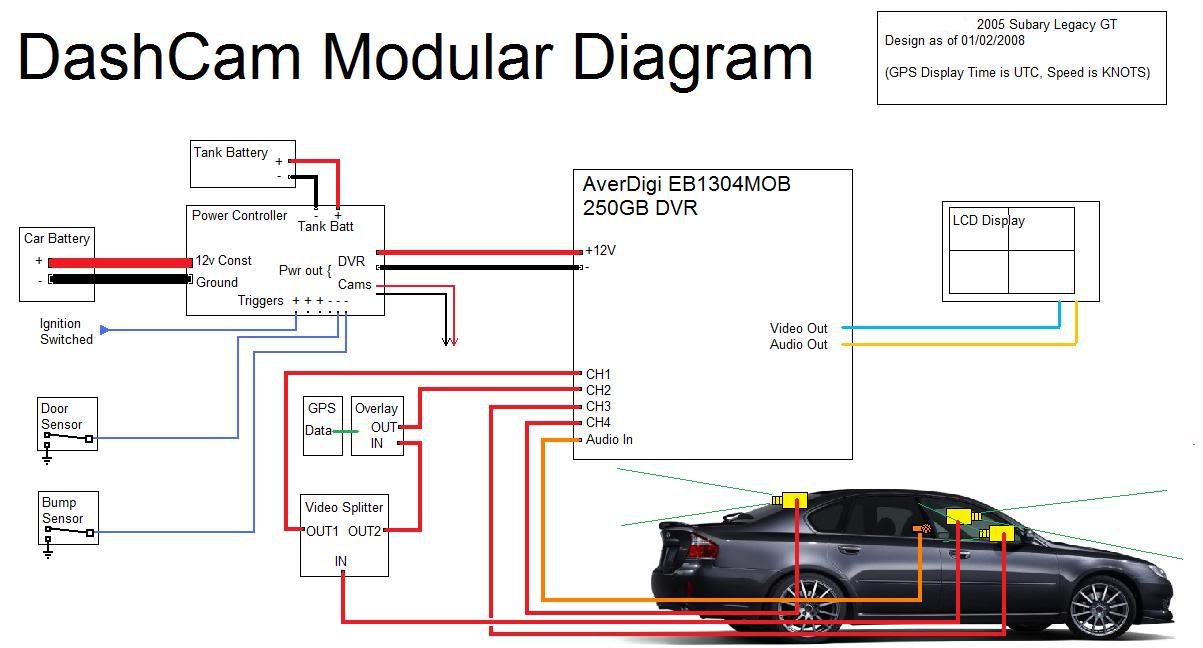
Image source: Bing (Web (fair-use with source credit))
Here’s the catch though. Your power bank doesn’t sit directly inside the car’s 12-volt system. It’s an independent battery pack.
It plugs into the dash cam via USB cable, same as you’d charge your phone. The dash cam never sees 12 volts unless something goes sideways with the wiring or you’re using a direct cigarette lighter tap instead.
Some drivers plug the power bank into the car’s 12-volt outlet while it’s charging, then route USB power to the camera from there. This arrangement keeps the power bank topped off but creates a dual-source situation that can confuse power management circuits. A few dash cams don’t handle dual power inputs gracefully.
They may glitch, restart, or shut down unexpectedly. That’s why the cleanest setup runs the power bank as the sole supply during parking mode, then lets the car’s own ignition power the camera normally while driving.
A growing number of dash cams support USB-C Power Delivery negotiation. These units talk to the power source and request higher voltages like 9V or 12V when needed. Most power banks don’t speak that language at the right level for automotive use.
If your camera lists USB-C PD support, check the manufacturer’s guidance before pairing it with a portable charger. Finding a reliable recording device often involves checking these input specs early so you don’t hit compatibility surprises later.
The physical chain looks like this. Power bank output port connects via USB cable to the dash cam input port. That’s it.
No splicing wires. No soldering. No fuses between the two components because the power bank handles its own internal protection.
If you go the harder route of running power through the car’s accessory socket, then you absolutely need inline fuse protection on the positive lead. Proper wire gauge matters too. Thin wires under load can drop voltage, causing the camera to behave erratically.
A few dash cams ship with their own small built-in batteries. These are backup capacitors at best. They hold maybe five to fifteen minutes of buffer power.
They are not designed for all-night parking surveillance. That’s where the external power bank earns its keep. It becomes the actual energy reservoir instead of a fleeting capacitor.
You might also explore alternative mounting solutions if your current setup feels cramped. Sometimes the issue isn’t power at all. It’s placement.
A poorly positioned camera captures terrible footage regardless of how cleanly you feed it electricity.
The Core Risks: Why This Setup Can Go Wrong
Let’s be honest. This isn’t rocket science, but it does carry real risks that most people gloss over. The biggest danger comes from cheap power banks that cut corners on cell quality and protection circuitry.
We see these everywhere. Gas station shelves, discount bins, unbranded listings online. They look identical to name-brand units at first glance.
They are not identical underneath.
Lithium-ion cells in low-cost power banks sometimes lack proper Overcharge Protection, Over-Discharge Protection, Short Circuit Protection, and Thermal Cutoff circuits. When all four protections work together, they form a Battery Management System or BMS. A missing BMS layer turns your power bank into a ticking thermal event waiting for the right trigger.
That trigger could be a hot car interior, a manufacturing defect, physical damage from a dropped charge, or simply years of cycling that degraded the cell separators.
The second risk lives in the voltage mismatch department. Most dash cams expect exactly 5 volts at 2 amps minimum. Some draw more.
If your power bank sags below 4.5 volts under load, the camera may shut down mid-recording. Corrupted video files are painful. Lost evidence is worse.
If the voltage spikes above 5.5 volts due to faulty regulation, you can damage the camera’s power input board permanently.
Parasitic drain on your vehicle battery represents a third concern worth taking seriously. If you leave the dash cam wired directly to the car battery through a hardwire kit and the power bank somehow feeds back into that circuit, you might kill your starter battery before morning. Modern cars have sensitive electronics.
A drained 12V battery can trigger reset sequences, radio code locks, and window calibration loss. The repair bill ranges from a jump start to thousands in module damage depending on the vehicle.
Overheating inside a closed car is the fourth and arguably most dangerous risk. Cars parked in direct sunlight easily exceed 60 degrees Celsius inside the cabin. Lithium batteries degrade faster at sustained high temperatures.
At 60C, the degradation rate accelerates significantly compared to room temperature operation. Add the heat generated by the power bank itself while delivering continuous current and you compound the problem. Swelling cells, venting gas, and in extreme cases thermal runaway become real possibilities.
A fifth risk involves data corruption from inconsistent power delivery. Cheap power banks struggle to maintain stable output under fluctuating loads. Dash cams cycle power constantly between recording, sensor polling, and storage writes.
If the voltage wavers during those cycles, the SD card can suffer read-write errors. Corrupted flash memory creates gaps in your footage exactly when you need it most. Insurance adjusters and attorneys do not care that your power bank hiccuped.
Extending surveillance coverage beyond the vehicle sometimes leads people to run equipment far outside its intended design parameters. The same principles apply whether your camera watches your driveway or your bumper. Consistent clean power matters either way.
The UL 2054 standard covers portable rechargeable batteries used with laptops and portable electronics. It sets requirements for overcharge protection, short circuit protection, and mechanical stress testing. Any power bank carrying genuine UL 2054 certification passed those safety benchmarks.
Always verify the label exists before trusting a charger to run your vehicle camera overnight.
Dash Cam Power Draw vs. Power Bank Capacity: The Math
Numbers don’t lie, even when opinions do. Let’s talk about what your dash cam actually consumes and what that means for your power bank selection.
A typical dash cam pulling 5 watts at 5 volts draws 1 amp. In parking mode with motion detection enabled, draw drops to roughly 0.2 to 0.6 amps depending on the unit and settings. Dual-camera systems naturally pull more.
Front plus rear channels active simultaneously push consumption toward 8 to 12 watts in driving mode and 1.5 to 3 watts in parking mode.
Power banks list their capacity in milliamp-hours, usually measured at the internal 3.7-volt cell voltage. A 10,000mAh power bank doesn’t actually deliver 10,000mAh at 5 volts. Conversion losses from voltage stepping and circuit inefficiency eat into that number.
Real-world usable capacity sits around 60 to 70 percent of the rated figure. That means a 10,000mAh unit delivers roughly 6,000 to 7,000mAh at 5 volts output.
Here’s a practical breakdown to help you estimate runtime before committing to any purchase:
| Dash Cam Type | Active Recording Draw | Parking Mode Draw | 10,000mAh Usable Output | Estimated Runtime |
|---|---|---|---|---|
| Single front camera | 5W (1A @ 5V) | 0.5A | ~6,500mAh | 13 hours |
| Single front camera (high-drain) | 8W (1.6A @ 5V) | 1A | ~6,500mAh | 6.5 hours |
| Dual camera system | 10W (2A @ 5V) | 2A | ~6,500mAh | 3.25 hours |
| Dual camera (continuous parking) | 10W (2A @ 5V) | 0.3A | ~6,500mAh | 21+ hours |
These are estimates based on aggregate manufacturer specs and independent testing reports. Your actual runtime depends on screen usage, GPS logging overhead, Wi-Fi module activity, and temperature effects on cell chemistry. Cold weather reduces available capacity noticeably.
Heat degrades long-term capacity permanently.
You need to decide what parking mode behavior you actually want. Motion-only triggering conserves power dramatically because the camera sleeps most of the time and only wakes when movement crosses its field of view. Time-lapse parking mode records a frame every few seconds continuously.
It uses more power than motion-triggered recording but captures significantly more data. Constant surveillance mode keeps the sensor active around the clock. This drains battery fastest and may trigger false positives from shadows, passing traffic, or weather.
Most experienced users run a hybrid approach. Enable motion detection with a moderate sensitivity setting, keep time-lapse as a secondary option, and disable constant recording unless you’re in an exceptionally high-risk parking environment. This strategy maximizes runtime while still capturing meaningful evidence.
If your goal is just overnight protection, a 10,000mAh power bank handles a single-camera unit comfortably. Going longer than eight hours pushes you toward needing a 20,000mAh unit or a properly installed hardwire solution. Anything beyond twenty-four hours of continuous parking mode without intervention becomes unreliable with portable chargers alone.
Checking your feed remotely gives you visibility into what’s actually happening. Even if you don’t need real-time access for parking surveillance, understanding your camera’s power states helps you set it optimally before you lock the car and walk away.
When a Power Bank Setup Actually Makes Sense
This approach isn’t for everyone. It makes sense in specific situations where convenience outweighs the slight compromise in reliability compared to a permanent hardwire install. Here’s where it truly shines.
Rental cars and borrowed vehicles present the strongest use case. Nobody wants to splice wires into someone else’s car. A power bank delivers monitoring capability without modifying the vehicle at all.
You plug it in when you park. You unplug it when you leave. Done.
Fleet managers sometimes deploy power bank setups across temporary assignments. Driver swap patterns, short-term projects, and loaner vehicles all fit this model. The portability factor eliminates installation labor costs while still providing basic incident documentation.
Van life and camper conversions represent another valid scenario. RV electrical systems vary wildly in quality and capacity. Running a hardwire kit into a poorly maintained house bank invites problems.
A self-contained power bank avoids that liability entirely while delivering consistent 5-volt USB output.
Temporary living situations matter too. If you rent a space without permission to install permanent wiring, or you’re parked at a construction site with uncertain power availability, a portable charger gives you flexibility that hardwiring cannot match. You can relocate the entire monitoring setup whenever your circumstances change.
Shared households with multiple family members using one dash cam across different vehicles benefit from this approach. Each person charges the unit in their own car, then moves it over. No splicing.
No electrical confusion. No arguments over who drained whose battery.
Commercial drivers logging long hauls sometimes prefer this method during layovers. Hotel parking lots vary enormously in security quality across different cities. A power bank lets them activate surveillance when the location feels uncertain and skip it when the lot is well-lit and attended.
This selective approach extends both power bank life and overall system lifespan.
If you find yourself managing mounting your camera properly on multiple vehicles anyway, adding a portable power solution completes the mobile surveillance picture naturally. The workflow stays consistent no matter where your vehicle ends up overnight.
However, this setup falls apart quickly if you need multi-day parking mode coverage without access to a wall outlet. It also struggles in extreme temperatures where lithium performance degrades significantly. And it simply cannot match the reliability of a properly fused hardwire installation for permanent vehicle protection.
Know your constraints before committing to this approach.
Step-by-Step: Safely Connecting a Power Bank to Your Dash Cam
Getting this connected correctly matters far more than just plugging two USB cables together. Follow these steps carefully and you will avoid most common failure points before they happen.
First, verify your dash cam’s power requirements. Check the spec sheet or the small print on the back of the unit. You need to know whether it expects 5V at 1A, 2A, or higher.
Writing this down prevents a mismatch later.
Next, select a power bank that exceeds your camera’s needs by at least fifty percent. If your dash cam draws 2 amps at 5 volts, choose a unit rated for at least 3 amps continuous output. This headroom keeps the power bank running cooler and extends its lifespan significantly.
Check that your power bank carries UL 2054 certification or equivalent safety testing. Look for the label on the device body itself, not just the packaging. Missing certifications mean missing safety protections.
We have seen too many incidents where uncertified units failed under sustained load conditions.
Prepare a clean USB cable in good condition before you start anything. Inspect both connectors for bent pins or frayed insulation. A damaged cable creates resistance and generates unwanted heat along the entire run.
Replace any cable showing wear even if it still technically works.
Decide where you want to place the power bank inside your vehicle. Options include the glove box, center console, under a seat, or a trunk compartment away from direct sunlight. The ideal location stays cool and out of sight from potential thieves.
Whatever spot you choose, secure the unit so it cannot slide or roll around while driving.
Connect the power bank to your dash cam using the USB cable before powering anything on. Make sure the dash cam is OFF first. Then turn on the power bank and observe the camera startup sequence.
The lens should extend automatically and the status LED should indicate normal operation. If the camera does not respond within thirty seconds, power everything down and check your connections.
Configure your dash cam parking mode settings before leaving the vehicle. Set motion detection sensitivity to medium rather than high. High sensitivity triggers constantly on busy streets and drains power faster than necessary.
Choose time-lapse intervals based on how long you typically park overnight. Five second intervals offer a solid balance between coverage and energy use.
Test the complete setup for at least one full driving cycle before relying on it for overnight parking. Drive normally, lock the car, and return later to check that the dash cam recorded properly. Review the footage quality and confirm no gaps exist in the timeline.
Troubleshooting during daylight hours beats discovering problems after an incident occurs.
Consider your vehicle’s electrical setup as part of this workflow. Understanding the vehicle installation process helps you avoid accidentally creating feedback loops between multiple power sources. Always disconnect the cigarette lighter adapter when switching to power bank mode to prevent dual-input conflicts.
Once you feel confident in the daily routine, document your configuration settings. Note the power bank capacity, cable length, camera model, and parking mode preferences in one place. Future troubleshooting becomes dramatically easier when you can reference exact numbers instead of vague recollections.
Hardwire Kit vs. Power Bank: Which Parking Mode Solution Is Right for You?
This decision defines whether you spend fifty dollars once or several hundred dollars in ongoing convenience. Both methods achieve the same goal of protecting your parked vehicle. They reach it through completely different approaches.

Image source: Bing (Web (fair-use with source credit))
A hardwire kit connects your dash cam directly to the vehicle’s fuse box. It draws power from the 12V battery through a fused tap and includes voltage cutoff protection to prevent draining your starter battery below safe levels. Most kits feature three wires: constant battery, ignition-switched, and ground.
Professional installation typically costs between eighty and two hundred dollars depending on vehicle complexity.
A power bank operates as a completely independent energy reservoir. It plugs into the dash cam through standard USB cabling with zero vehicle modification required. You charge it separately using a wall outlet or the car’s accessory socket.
The upfront investment ranges from twenty to one hundred twenty dollars depending on capacity and build quality.
| Factor | Hardwire Kit | Power Bank |
|---|---|---|
| Installation complexity | Requires fuse tap knowledge | Plug and play |
| Upfront cost | $80 to $200 professional install | $20 to $120 for unit |
| Ongoing cost | Nearly zero after install | Replacement every 1 to 3 years |
| Parking mode runtime | Unlimited while protected | Limited by capacity |
| Vehicle modification | Permanent wiring changes | None required |
| Reliability | Consistent power delivery | Degrades with cell aging |
| Portability | Fixed to one vehicle | Works across multiple cars |
| Failure risk | Incorrect install damages electronics | Cheap units overheat or swell |
Hardwire kits win decisively for permanent installations in vehicles you own long-term. They provide uninterrupted power without worrying about charging schedules, capacity degradation, or forgotten battery swaps. Modern hardwire kits from reputable manufacturers like BlackVue and Thinkware include intelligent voltage monitoring that cuts power automatically when the starter battery drops below twelve point four volts.
This protection makes them genuinely safe for overnight parking surveillance.
Power banks excel in situations demanding flexibility and zero commitment. Renters, ride-share drivers, and people who frequently switch vehicles benefit enormously from the portable approach. You can move the monitoring setup between your daily driver and a secondary car without touching a single wire.
This adaptability simply does not exist with hardwired solutions.
Dual-camera systems create an interesting middle ground. Some users hardwire their front camera while keeping a separate power bank dedicated to a rear channel. This hybrid approach reduces strain on either power source and provides redundancy if one fails unexpectedly.
Managing dual-camera wiring correctly requires understanding how each component draws current and sharing that load appropriately across available outlets.
The tradeoff comes down to convenience versus permanence. If you want set-it-and-forget-it reliability, invest in quality hardwire installation. If you value flexibility and occasional surveillance over dedicated monitoring, a power bank approach serves you well.
Neither option is inherently wrong. Each simply fits different lifestyles and vehicle ownership patterns differently.
Critical Mistakes to Avoid When Using External Power for Parking Mode
Mistakes here range from annoying to catastrophic. Learning from other people’s errors saves you significant time, money, and peace of mind going forward.
Never leave a power bank plugged into the dash cam inside an unattended hot car without supervision or a thermal cutoff strategy. Cars parked in direct sunlight routinely exceed seventy degrees Celsius internally within two hours. Lithium cells degrade permanently at those temperatures even when idle.
Extended exposure accelerates capacity loss and increases the probability of swelling or venting over time.
Do not assume every USB cable handles continuous current draw equally. Thin computer peripherals cables designed for keyboard charging often lack the copper gauge needed for sustained dash cam operation. They create resistance, generate heat, and drop voltage under load.
Always use cables rated for at least three amps continuous current. Heavy-gauge data cables work better than cheap charging cables for this specific application.
Avoid mixing power sources simultaneously unless your dash cam explicitly supports dual input switching. Plugging both a cigarette lighter adapter and a power bank into the same camera can create ground loops, voltage conflicts, or unexpected shutdowns. Most dash cams are not designed to accept two power sources at once.
Check your manual before attempting this configuration.
Never install an inline fuse on the USB line thinking it adds protection. Standard USB fuses blow at currents far below what your dash cam needs. Your camera will brown-out and restart repeatedly whenever demand spikes during recording cycles.
Fuses belong on 12V hardwire installs only, never on USB-powered configurations.
Don’t ignore warning signs like warmth, swelling, or unusual behavior from your power bank. These symptoms demand immediate discontinuation of use. A warm power bank during normal operation may be acceptable depending on ambient temperature.
A hot power bank that discomforts your hand indicates problems requiring investigation before continuing operation.
Forgetting to monitor your vehicle’s starter battery represents one of the most common oversights. Some users plug the power bank into the cigarette lighter while also leaving the dash cam hardwired. This double connection can drain the starter battery through unexpected current paths.
Always physically disconnect all cigarette lighter adapters when switching to pure power bank operation.
Skipping the initial test drive before committing to overnight parking mode guarantees you will discover problems at the worst possible moment. Always validate your complete setup during supervised daytime hours first. Record test footage, check file integrity, and verify parking mode activation before trusting the system with real security responsibility.
Using expired or damaged SD cards alongside an external power source compounds failure risks. A corrupted card causes the camera to retry writes continuously, increasing power consumption unpredictably. Proper storage media selection and regular replacement schedules keep power demands stable and predictable throughout the monitoring period.
Power Bank Specs That Matter: What to Look for and What to Ignore
Marketing departments love burying important information under impressive-looking numbers designed to impress rather than inform. Learning to read between the lines protects you from purchasing the wrong equipment.

Image source: Bing (Web (fair-use with source credit))
Capacity rated in milliamp-hours deserves scrutiny beyond the headline number. Manufacturers measure at the internal cell voltage of roughly 3.7 volts. Your dash cam receives power at five volts after conversion.
The actual usable capacity at USB output sits closer to sixty-five percent of the printed rating after accounting for conversion losses. A true 10,000mAh specification translates to approximately 6,500mAh of real world usable capacity at five volts output.
Continuous discharge rating matters enormously for dash cam applications. Many power banks advertise peak surge currents of three or four amps but cannot sustain those levels indefinitely. Look explicitly for the continuous output rating listed in the specifications.
Your dash cam needs steady current delivery, not brief burst capability. Units advertising only peak ratings without continuous figures often struggle during extended parking mode sessions.
Voltage regulation quality separates reliable units from dangerous ones. Quality power banks maintain output between 4.8 and 5.2 volts across their entire discharge curve. Cheap alternatives allow voltage to sag below forty-five volts as capacity depletes.
This undervoltage condition causes cameras to shut down randomly during critical moments. Reputable brands publish detailed discharge curves showing voltage stability throughout the capacity range.
Certification labels provide genuine protection assurance when present. UL 2054 certification verifies the unit passed overcharge, short circuit, and mechanical stress testing per established standards. CE marking confirms European conformity but means far less for individual safety verification.
FCC certification addresses electromagnetic interference rather than electrical safety. Prioritize UL certification above all other labels when selecting units for automotive use.
Cell chemistry type profoundly affects longevity and safety characteristics. Lithium-polymer cells offer flatter form factors and slightly better safety margins than older lithium-ion designs. Lithium iron phosphate chemistry provides exceptional thermal stability and longer cycle life but operates at lower voltage and requires different charging profiles.
Most consumer power banks use standard lithium-ion or lithium-polymer construction. Verify the chemistry specification before purchasing.
Ports and output specifications deserve careful reading. Some power banks list multiple output ports with different current ratings. Running your dash cam from a port labeled five volts at one amp guarantees insufficient current delivery.
Always match your power source port rating to your camera’s maximum current requirement plus twenty percent headroom minimum.
Weight and physical dimensions influence practical deployment choices. High-capacity units weighing over two pounds require secure mounting positions that withstand vehicle vibration. Lightweight units under one pound may lack the capacity needed for extended parking surveillance.
Balance portability requirements against actual runtime needs realistically.
Quality dash cam models from established manufacturers publish complete electrical specifications including exact current draw across all operational modes. Cross-reference these numbers against power bank capabilities before making any purchase decision. Matching specifications precisely prevents most common failure scenarios.
Temperature Dangers: Why Your Car Is Not a Safe Place for Lithium Batteries
Temperature represents the single biggest environmental threat to both power bank performance and vehicle safety. Understanding how extreme heat and cold affect lithium chemistry transforms responsible usage from guesswork into informed decision-making.
Interior temperatures in parked vehicles follow predictable patterns based on outside conditions, window tinting, color, and sunlight exposure. On a sunny day at seventy-five degrees Fahrenheit outside, dash surfaces can reach one hundred sixty degrees Fahrenheit within thirty minutes. This temperature range exceeds safe operating limits for most lithium battery chemistries by a wide margin.
Lithium-ion batteries degrade progressively at elevated temperatures regardless of whether they are actively discharging. At sixty degrees Celsius interior temperatures, calendar aging accelerates dramatically compared to room temperature storage. Each hour spent at these temperatures inflicts cumulative damage that reduces total capacity permanently.
A power bank surviving one summer in a parked car may deliver twenty percent less capacity the following winter.
Thermal runaway represents the worst-case scenario requiring serious respect. This condition occurs when internal cell temperature rises fast enough to trigger self-sustaining exothermic reactions. Once initiated, the reaction propagates through adjacent cells rapidly and produces temperatures exceeding one thousand degrees Celsius.
Real起火 incidents from power banks in vehicles remain rare but well-documented across multiple safety databases.
Warning indicators demand immediate attention when noticed anywhere near your vehicle. Swollen or bulging power bank casings signal internal gas buildup from separator degradation. These units should never be charged, discharged, or stored inside any enclosed vehicle space.
Dispose of swollen batteries according to local hazardous waste regulations immediately rather than risking further use.
Cold weather creates opposite but equally problematic challenges. Below freezing temperatures temporarily reduce lithium battery capacity by thirty to fifty percent depending on severity. Charging cold batteries above thirty-two degrees Fahrenheit causes lithium plating inside the cells.
This plating creates permanent capacity loss and increases internal resistance over subsequent charge cycles. Never charge a frozen power bank while it remains cold.
Practical mitigation strategies exist for drivers in extreme climate regions. Garage parking reduces thermal exposure dramatically compared to street parking in direct sun. Insulated storage compartments between seats protect power banks better than open dashboard locations.
Removing the unit from the vehicle entirely during overnight parking in extreme conditions eliminates all thermal risk while sacrificing convenience.
Several home surveillance applications benefit from the same temperature management principles when extending monitoring beyond vehicle boundaries. Indoor environments naturally provide more stable conditions for lithium battery operation. Understanding thermal constraints helps you place equipment optimally regardless of location.
Checking temperature readings through live feed monitoring capabilities allows remote awareness of environmental conditions affecting your equipment. Some advanced dash cam systems report internal temperature as part of their diagnostic data. Monitoring this metric helps you identify dangerous conditions before they cause permanent damage to expensive recording equipment.
Maintaining the Setup: Protecting Your Car Battery and Your Equipment
Proper maintenance separates setups that last years from ones that fail within months. The power bank itself requires regular inspection and care just like any other lithium battery device you own.
Start by checking your power bank’s physical condition monthly. Look for any swelling, discoloration, or damage to the casing around charging ports. Even minor bulging indicates internal cell degradation requiring immediate replacement.
Never continue using a swollen unit regardless of how functional it appears electrically.
Clean USB ports periodically with compressed air or a soft brush to prevent dust accumulation. Debris in charging ports creates poor connections that generate heat and cause intermittent power delivery. Dirty contacts also increase electrical resistance which reduces overall efficiency during discharge cycles.
Rotate your power bank’s charge state between twenty and eighty percent whenever possible. Deep discharges below ten percent stress lithium cells unnecessarily. Constantly keeping units fully charged above ninety-five percent also accelerates aging.
Maintaining mid-range charge states extends total cycle life significantly compared to extreme state patterns.
Test your power bank capacity annually using a USB power meter if you want precise measurements. These inexpensive devices show actual voltage, current, and wattage during both charging and discharging phases. Comparing measured output against rated specifications reveals true remaining capacity and helps you decide whether replacement is warranted.
Your vehicle’s starter battery deserves equal attention when using external power solutions. Check voltage readings with a multimeter before and after extended parking mode sessions. A healthy resting battery reads twelve point six volts minimum.
Anything below twelve point four volts suggests potential starting problems after overnight camera operation.
Keep your dash cam’s firmware updated regularly through manufacturer channels. Firmware updates often improve power management algorithms and parking mode efficiency. Outdated software can cause excessive current draw that drains batteries faster than specifications indicate.
Monitor your SD card health alongside power system maintenance. Corrupted cards force the camera to retry writes continuously, increasing power consumption unpredictably. Schedule periodic card replacement based on manufacturer recommendations rather than waiting for visible failure symptoms.
Consider your local climate when planning maintenance intervals. Hot environments demand more frequent inspections due to accelerated cell aging. Cold regions require checking connections more often because thermal contraction loosens plugs over time.
FAQs: Can You Use a Power Bank for a Dash Cam
What happens if my power bank dies while parked overnight?
Most dash cams enter a low-power sleep state when external power disconnects unexpectedly. Some units save ongoing footage to internal buffer memory until depletion. Others simply stop recording immediately without warning.
Check your specific model’s behavior in the manual before relying on it for critical surveillance periods.
Can I leave my power bank charging inside the car while using it?
This dual-source configuration creates potential conflicts between power management systems. Most dash cams cannot intelligently switch between cigarette lighter power and USB power bank input simultaneously. Choose one power source at a time and avoid mixing both methods unless your camera explicitly supports dual-input switching according to manufacturer specifications.
How do I know if my power bank has enough capacity for overnight parking?
Multiply your dash cam’s parking mode current draw in amps by desired runtime hours. Then convert that requirement into milliamp-hours at five volts. Compare the result against your power bank’s usable capacity, remembering that actual output equals roughly sixty-five percent of rated capacity.
Always add twenty percent safety margin to your calculation for temperature effects and conversion losses.
Will using a power bank void my dash cam warranty?
Manufacturer warranties vary significantly across brands and models. Some explicitly permit third-party power sources while others require proprietary adapters only. Review your warranty documentation carefully before connecting external equipment.
Using uncertified power banks may void coverage if electrical damage occurs during normal operation according to typical warranty terms.
Is it safe to use a power bank in freezing temperatures?
Cold temperatures temporarily reduce lithium battery capacity by thirty to fifty percent depending on severity. Charging frozen batteries causes permanent damage through lithium plating inside cells. Store power banks indoors when possible during extreme cold weather.
Allow frozen units to reach room temperature before attempting any charging or discharging operations to prevent cell damage.
How often should I replace my power bank for dash cam use?
Lithium battery capacity degrades measurably after two to three years of regular cycling even with proper care. Expect twenty to thirty percent capacity loss annually under normal conditions. Replace units showing significant swelling, reduced runtime, or inconsistent voltage delivery regardless of age.
Annual capacity testing helps determine optimal replacement timing before unexpected failures occur.
Final Verdict: Is a Power Bank Worth the Risk for Your Dash Cam?
Power bank dash cam setups work reliably when approached with proper knowledge and realistic expectations. They excel in situations demanding flexibility without permanent vehicle modification. They stumble when pushed beyond their design parameters or deployed with cheap uncertified equipment.
The risks are real but manageable through informed decision-making. Thermal events from quality certified power banks remain extremely rare in normal operation. The more common failures involve capacity degradation, voltage sag, and corrupted recordings from insufficient power delivery.
These problems are preventable through careful spec matching and regular maintenance.
For renters, ride-share drivers, and multi-vehicle households, power bank solutions offer unmatched convenience and adaptability. The ability to move surveillance capability between vehicles without touching electrical systems represents genuine value that hardwired alternatives cannot match. This flexibility justifies the slightly higher maintenance requirements for many users.
Permanent vehicle owners seeking set-and-forget reliability should consider professional hardwire installation instead. Hardwire kits eliminate capacity anxiety, remove charging hassles, and provide consistent power delivery that improves with age as you learn your specific setup. The higher upfront investment pays dividends through years of worry-free operation.
Hybrid approaches combining both methods deserve consideration for high-risk environments. Running a front camera through hardwire while powering a rear channel from a separate power bank distributes risk across independent systems. If one power source fails, the other continues recording essential footage from at least one angle.
Your specific circumstances should drive this decision rather than generic recommendations. Evaluate how long you typically park overnight, what climate conditions you face, whether you own or rent your primary vehicle, and how important continuous monitoring really is to your security needs. No single solution fits every driver perfectly.
Exploring additional mounting options might reveal alternative configurations better suited to your situation than either pure power bank or hardwire approaches. Sometimes the best solution involves creative combinations tailored to unique parking patterns and vehicle characteristics.
Quality matters enormously throughout this entire equation. Cheap power banks from unknown manufacturers offer false economy that quickly becomes expensive through repeated replacements and potential vehicle damage. Investing in properly certified equipment from reputable suppliers protects both your recording gear and your vehicle’s electrical system far more effectively than price comparisons alone ever could.

Tony Kilmer is an auto mechanic and the author behind CarTruckAdvisor.com. He shares practical, no-nonsense guidance on car and truck maintenance, common problems, and repair decisions—helping drivers understand what’s going on and what to do next.